
2009
- I have noticed that video playback, particularly pausing and fast-forwarding, works better on content that is on the local hard drive.
- As crazy as this sounds, I’ve occasionally bottle necked my iTunes ‘server’. If you are pulling multiple audio streams, multiple video streams and another device starts a large sync you can get some stutter. This is not typical, and is a by product of my large deployment. The bottleneck ends up being I/O at the iTunes Library, in my best guess of the situation.
- More local content makes me less dependent on the iTunes ‘server’ being on all the time. I’ve had a couple of situations where I’ve had it powered down or cut a network for repair and caused problems with media playback.
- I found that removing the bottom rubber pad was much easier to do when the unit was hot. I highly recommend having the Apple TV on for several hours and doing the removal when the unit is still hot. I had no issues removing the bottom pad on the two I did warm, but the third I did cold and I ended up with a couple of tears in the bottom rubber. Nothing significant, but annoying.
- You’ll need two Torx screwdrivers. The case screws are T-10, which you probably have if you have any Torx sets (my set was T-10, T-15 and T-20). But the hard drives is held in with T-8’s. I had to make a trip to the hardware store for a T-8 bit.
Me: Can I have a double espresso.
Panera: Ahh, what was that?
Me: Just two shots of espresso.
Panera: Ok.
Panera: Do you just drink it like that?
Me: You mean just straight?
Panera: Yeah.
Me: Of course.
Panera: Huh, wow.
First swim class in several months.

Too cold to walk the dogs this morning.
Mazie Sings Santa Claus is Coming to Town
Mazie really got into Christmas this year. It made Christmas so much more fun for me this year just to see the excitement and enthusiasm she had for the big day. She started to sing along to some of the Christmas Music we had playing and were singing to ourselves and really got into Santa Claus is Coming to Town.
Shortly after Christmas she picked up her guitar and gave her own rendition. Cutest video ever. :-)
Lightroom Tip: Smart Collection for Pictures Without Location
Lightroom 2 introduced a badly needed feature, Smart Collections. I was ecstatic about using Smart Collections to assist with workflow. One of those workflows I’ve been working on has been adding IPTC location data to my photos, essentially setting the Country, State, City and Location for photos. It would be great to create a Smart Collection that included all photos that do not have location details and then just work through it with photos automatically being removed after adding the information. You can try this by creating a Smart Collection like this:
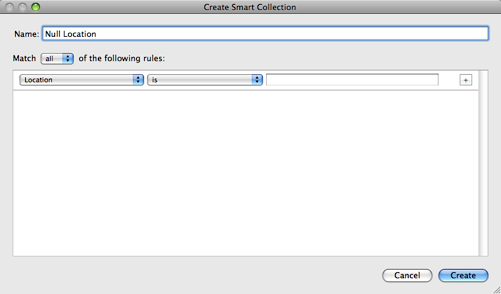
But, it won’t work. Lightroom doesn’t have an operator “is blank”. The next best thing is to just do “is” and set the value to nothing, but Lightroom doesn’t honor this and just assumes you made a mistake. I stopped here for a long time and just assumed what I wanted to do wasn’t possible. However, then I came up with this workaround:
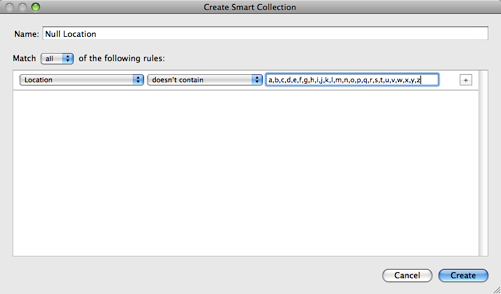
And this works perfect! Create a smart collection using “doesn’t contain” for each letter in the alphabet and you will get the desired result, all photos that do not have anything in their location. Great!
Kiva Impact
I’ve been a Kiva user for over a year now and have done several micro-loans with it. This is a really cool video that shows the personal side of Kiva and how such micro-loans can really impact peoples lives.
Check out my lender page. I owe a thanks to Aaron Oliver for introducing me to Kiva with a gift, to regift through a loan.
Bottle Cap Tripod
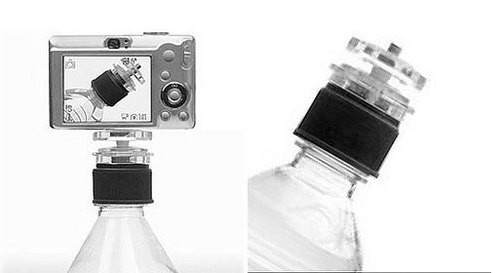
This is pretty cool. While I’m not going to support anyone using plastic water bottles, if you have something that this mounts to it could be really handy. Someone want to make a version of this that can screw into a SIGG bottle? adaptinstyle:
why carry around a cumbersome tripod when all you want to do is capture a group photo or mount a small video camera for stable filming?
this ingenious little device turns standard water bottles into tripods allowing you to setup the perfect shot with physical ease—and what a conversation piece!
Awesome Customer Service from Petzl

When you buy outdoor equipment there is always a stark difference in price between the store brand, entry-level products and the premium outdoor versions. The promise behind that premium price is a level of customer service that understands that you are getting this gear to use it, and they will stand behind it in real-world usage.
A few years ago I got my father-in-law a Petzl Zipka Plus headlamp and he’s used it a good amount. He mentioned a few weeks ago that he had slipped outside and the headlamp had popped off his head and hit some rocks at just the right angle. The lamp still worked, but the case was badly cracked making it vulnerable to water, and the retracting mechanism was completely destroyed. We figured he probably just needed a new one, but I wanted to give customer support at Petzl a shot.
I realized this was out of warranty, and even if it was in the warranty period the situation wasn’t something I would expect them to cover. I emailed customer support and they got back to me right away and suggested I send the lamp in and they would take a look at it. They got it, proactively notified me of the status of the repair, did the repair and sent it back in a couple of weeks.
I was really impressed with how well they stood behind their product. It’s refreshing to see companies live up to their premium promise. Way to go Petzl! Thank you!
I'm going Dog Sledding, with my Camera!
This will be me in a couple of weeks, except I’ll have a camera strapped around my neck too.
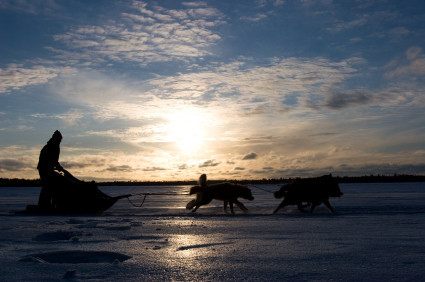
Photo by Dennys Bisogno
Several weeks ago Tammy was trying to figure out what to get me for my birthday, and she found this trip that she thought was a perfect gift for me. Wintergreen Dogsled Lodge offers a huge variety of dog sledding trips, but they have one very special Photo Workshop. Layne Kennedy, professional photographer, leads this 10-person dog sledding adventure for photographers to learn more, shoot a bunch and have workshops every night after you’ve packed in for the night. It sounded awesome. But it was booked up. Her hopes were dashed and she found other options for my birthday.
Last week she got an email from them that they had a cancellation and a spot opened up! I’ve now got a trip up to Ely, MN scheduled at the end of this month!
Wintergreen seems like a phenomenal outfitter for a dog sledding trip. Tammy had done a bunch of looking into that type of trip and said they consistently were at the top of everyones list. ABC News did a segment on them and dog sledding in Northern Minnesota that is fun to watch.

Layne Kennedy has a great website with a lot of really great photographs on it. However, I got even more excited to take this class after listening to him on a piece he did for Nikon World called Northern Exposure.
Layne Kennedy’s advice to workshop participants is not to worry so much about taking pretty pictures. Compelling images are those that tell a story — a story that often starts with a question.
Kennedy has done amazing work and I hope to learn an incredible amount on this trip. I’m also completely jazzed about hanging out with these amazing dogs and a great group of people in some really, really cold weather. I think I’m going to start letting my beard grow out a bit.
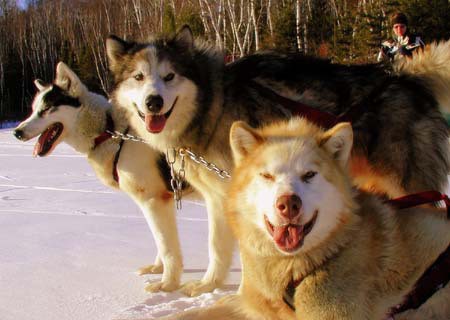
Photo from Wintergreen Dogsled Lodge.
Upgraded Apple TV Hard Drives
I’ve been really pleased with the newest releases of the Apple TV software. Notably, the incorporation of AirTunes has resulted in me using them a lot more for stand-alone music playback. Contrary to what I’ve said many times in the past, I started to wish that I had more content local on the Apple TV units themselves. Why? A couple of reasons.
I decided to take the plunge and do the upgrade. I had read about the procedure and it seemed pretty simple. Certainly way easier than hacking an Xbox. No soldering required here. If you are curious about doing this yourself, I followed the Engadget article on upgrading your Apple TV hard drive. I’ll add some of my own comments on the process below.
First thing, you need some drives. I ordered three of the Western Digital Scorpio Blue 250GB 2.5" PATA drives from NewEgg.
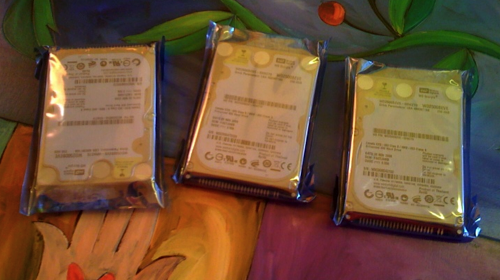
With the drives in hand, it was time to rip open one of the Apple TV’s and give it some bigger storage. This is really the only tricky part of the upgrade, since the Apple TV is not meant to be opened by the end-user.
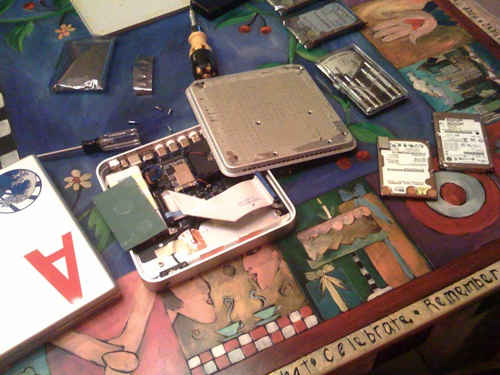
The process is pretty painless, but I will highlight a couple of things not found in all the How To articles.
After doing the first one, the process was really simple and didn’t take long at all. After getting the drive out you have to duplicate the image from the factory installed drive to the new drive. You do this with [dd](http://en.wikipedia.org/wiki/Dd_(Unix)). You’ll need to be able to easily connect the drive to a computer. I had a USB adapter that can be connected to a bare drive already so this was easy. The dd step takes a while. It took 2 hours for me to read the drive and make the image, and another two hours to write the image onto the new drive.
Note, some of the write-ups suggest modifying the writing to not write the media files. I just did the entire image. Saving time here was not a priority for me, I wanted the drive exactly the same.
I wimped out and used iPartition to resize the Media partition. That turned a dozen commands into a click of the mouse and a few seconds of drive spinning. I figure I can use iPartition for other things too. After the repartition you just put it all back together and plug it in again.

Just like that I had a ton of available storage, and let iTunes spend another few hours filling it up with content.

I have noticed that iTunes synchronizes things in a specific way when you have a big drive. All of my music is stored locally on each Apple TV, I like that. But priority seems to be given to unwatched TV Shows. There seems to be a rule in the sync that always wants those local if there is space. Probably makes sense, but it does mean that after TV and Music most movies are streaming. I wish there was a way to do something between automatic and custom sync. I’d like to do an automatic sync, but be able to pin a number of things to be local all the time. This would be really great for Mazie’s stuff that she watches repeatedly.
So far everything is great. I did find a bug in the Apple TV software while testing offline use of the Apple TV related to AirTunes. I think having more local content will make the user experience all that better. Plus, I dig the idea of leaving for a trip and just yanking an Apple TV to take along and having so much content with us in a small package.