
2009
- mandate that all coffee shops shall have available the appropriate serving containers for a pure espresso beverage;
- espresso shall be served in a thick-walled, pre-heated porcelain cup not to exceed 2 ounces in capacity; and
- all coffee shops shall have monthly certification tests for all employees requiring the creation of a shot of espresso with robust crema that will last at least 60 seconds undisturbed.
Mazie getting ready for brunch at Butter.

iTunes Tip: Using a "No Playlist" Playlist

I have all of my music in iTunes and it is my central hub for distributing nearly all content to various iPods, iPhones and Apple TV’s throughout the house and on-the-go. In my iTunes library, as of right now, I have 18,439 items totaling over 65 days of continuous music without any repeats. The only way to get the most out of a really large music collection is to leverage Smart Playlists extensively, and I do.
I have dozens of Smart Playlists to listen to all kinds of slices of my music archive. Creating these Smart Playlists involves setting the criteria of what I want in the playlist, but also, what I don’t want in the playlist. For example, unless the playlist is for Mazie’s enjoyment, I don’t want any Children’s Music in it. Similarly, unless the playlist is for the holidays, I don’t want Christmas music popping up. Sure, it’s a 5-star Christmas song, but that doesn’t mean I want to hear it in my 5-star Smart Playlist in July.
So, I started by having a lot of repeated rules in my Smart Playlists and having to update dozens of things anytime some of my criteria changed. After dealing with that, I figured out a way to be a lot smarter about my Smart Playlists. Use a Smart Playlist to remove the stuff you don’t want in other Smart Playlists.
“No Playlist” Playlist
To do this you first need to create your No Playlist Playlist. This could be called a “blacklist” of songs, but that seems more like unchecking songs. This is more a greylist of songs you only want to hear when you are specifically looking to hear them, regardless of their other qualities. Just create a Smart Playlist and make sure to change the match criteria to “any” or you will likely not have any matches. Also, it’s a good idea to uncheck the “Match only checked items” checkbox. If you don’t, and have other Smart Playlists that don’t check that, you will let some stuff through.
I have mine setup like this:
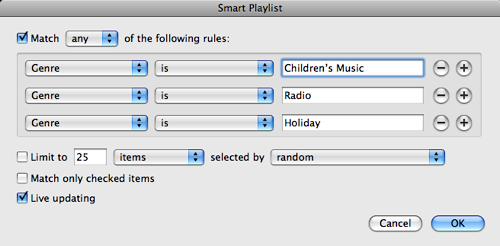
This creates my No Playlist Playlist with all Children’s Music, Radio content (archived episodes of This American Life mostly) and Holiday music. I’ve now got a good list. So, next I take my Smart Playlist of “Music from the ‘80’s”. Clearly I want all my great high school favorites, but I don’t want Mazie’s Red Grammer album showing up in there, or any other stuff from my No Playlist Playlist. So a simple rule as follows will keep it right (see the last criteria).
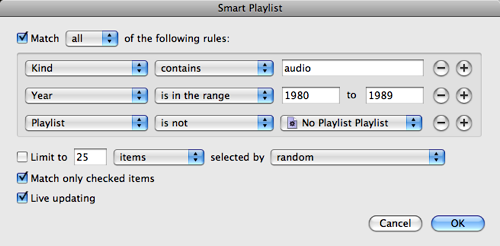
Now, the reason this is great is that I’ve now abstracted that rule into another set of conditions. So, if I forget one, like Comedy, that should be excluded from dozens of playlist I can simply change my No Playlist Playlist and it’s all better. I could even get funky with this and exclude tracks that were played within the last day or so, forcing rotation through other playlists without doing the work in each and every Smart Playlist.
Cool, huh?
Freedom of American Coffee Enjoyment Resolution
I suggest that congress work on enacting the following legislation:
Whereas many residents of the United States seek the pleasure of a coffee-based beverage, including many variations thereof, and that these beverages should be preserved for future enjoyment;
Whereas it is understood that espresso is a drink, and is not simply an ingredient to be added with milk or chocolate;
Whereas the history of coffee, and the native basis of coffee shall be understood;
Resolved by the House of Representatives (the Senate concurring),
That the United States Government should pursue policies that
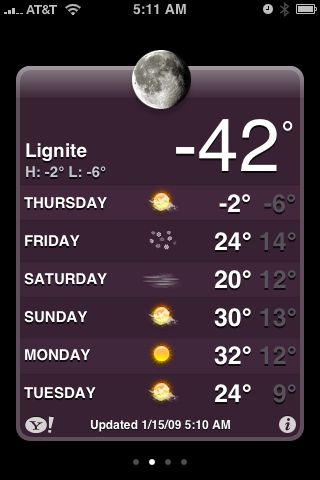
You know, it has been really cold here in Minneapolis lately. But, my relatives in Lignite, ND have it much worse. That’s -42 without any wind chill! Stay inside Grandma! 🙂
I wonder how long the HD acronym will be around. At some point it will just be the default right?
Hardwood floor installation has begun!

Huh? Sliced Apple Recall? Possible Listeria contamination? Go to the co-op people. Get your food from places that SHOULD sell food.
Time to start a slow drip of water in our shower to avoid a nearly certain frozen pipe overnight.
Stopping Twitter Updates on Facebook
If you are a friend of mine on Facebook you are going to see a lot fewer updates from me going forward. I’ve decided to no longer send Twitter updates to my Facebook profile.

I was having a great lunch with my friend Jim Bernard and he had mentioned that he had severed the Twitter-Facebook bridge and I was curious. He explained to me his reasoning and much of it rung true to me. I also reflected on feedback I got from people that I know on Facebook and they were commenting that I updated a lot, usually with a note of annoyance. The reality was I used Twitter a decent amount, and I never do Facebook updates.
Twitter was one of the early applications deployed when Facebook opened up their platform to third parties. I quickly added it and never thought much about it. Plus, at that time, the people I had connections with on Facebook were largely the same people that I had connections with on Twitter. So it seemed to make sense to just mirror things.
That has changed a lot. Facebook is a very different community than Twitter. There is a lot less overlap between my social network on Facebook than Twitter. Twitter users expect a different volume of updates, and have a wider range of context for those updates. Lastly, sending a lot of Tweets to Facebook just creates a lot of noise. The two systems have different cultures: Twitter is a hot tub, Facebook is a high school reunion.
If you want to still get my Twitter updates, you can follow me on Twitter. If we aren’t friends on Facebook, check out my profile page. I will continue to syndicate my blog posts to my Facebook profile.
MobileMe Sync Loves Apple, Inc.
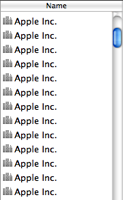 I was really hoping that the 10.5.6 Mac OS X update, which promised nice
improvements to MobileMe sync, would solve this incredibly annoying
problem that I've had for a long time with MobileMe. I'm not exactly
sure what is going on, but for some reason the Address Book entry for
Apple, Inc. replicates itself. Again. And again. And again.
I was really hoping that the 10.5.6 Mac OS X update, which promised nice
improvements to MobileMe sync, would solve this incredibly annoying
problem that I've had for a long time with MobileMe. I'm not exactly
sure what is going on, but for some reason the Address Book entry for
Apple, Inc. replicates itself. Again. And again. And again.
I’ve yet to identify the pattern, or a possible solution. I routinely, at least weekly, will launch address book and select several Apple, Inc. address book entries and then select Merge Selected Cards to consolidate them back to one. Wait a few more days and I’ll have multiple entries again.
This seems to be a special case with this card. It doesn’t happen with any other cards that I have. Anyone else see this behavior? Or better, know how to fix it?