Weekly Thing
A short pointer to my Weekly Thing newsletter. This category links out to weekly digests of interesting articles and personal updates; the actual archives live over on the newsletter site.
- Remove as much of the fiddly bits around formatting and connecting systems as possible, leaving my time for the creative part of writing and sharing.
- Allow some sections to be authored ahead of time, so I can create in small chunks of time.
- It should run on any platform. Some of my steps required software that only worked on iOS so I oddly couldn’t run my automation on my Mac.
- No Python scripts, all native Shortcuts. I had some steps that involved Python and that was harder to maintain and change.
- Durability, better error handling, and logging. When my automation didn’t work it was hard to know why. Not good when your on deadline!
- Automation for all sections. For 6 years the photo section has never been supported with automation.
- Shortcuts: This is the heart of the solution and where everything starts.
- Drafts: I use Drafts for a ton of things, including writing this blog post. Drafts has incredible support for Shortcuts and automation. Any sections of the Weekly Thing that are just writing I do in Drafts. These are then put into Workspaces in Drafts to interact with Shortcuts. For example, the Currently section is a Workspace in Drafts that is pulled in via a Shortcut.
- Data Jar: This is like a simple database that allows me to cache and store content for each Shortcut.
- S3 App: Great app that was a huge unlock for me since it allowed me to finally automate the Photo section, and in general makes it super simple to get files on the web from Shortcuts.
- Pinboard API: All the links in Featured, Notable, and Briefly come from Pinboard, and I author the blurbs about them in Pinboard as well. They end up in the respective section because I add a “_featured” or “_briefly” tag to them. If no tag, they are in Notable. The reason this works well is that I can author in Markdown in Pinboard, even though Pinboard has no idea what Markdown is.
- thingelstad.com RSS Feed: RSS is how I pull my blog posts into the Journal section. This is a little weird since I author my blog in Markdown, and then pull it via RSS in HTML, and then convert the HTML back to Markdown. That process seems weird but I will likely keep it since the conversion does a couple of nice things to insure the Markdown is well formatted.
- See if “Weekly Thing.«Current Issue».Fortune” exists in Data Jar, if it does return markdown and you are done.
- If “Weekly Thing.«Current Issue».Fortune” does not exist present random Fortunes to user until one is selected.
- Once Fortune is selected, store it at “Weekly Thing.«Current Issue».Fortune” and return markdown.
- Retrieve the RSS feed for www.thingelstad.com
- Find items in feed that are within the time period of this issue
- Convert each post to markdown and do some post processing to make it work in the newsletter better
- Detect any URL’s that are uploads into my blog, and make sure to not grab any others.
- Retrieve the image file at that URL
- Resize it to 1,200 pixels on the “long edge”
- Add to S3 bucket for files.thingelstad.com in the right directory for this issue
- Replace the original image URL with the new URL
- Add www.thingelstad.com/2023/09/2… from Sep 20, 2023 at 9:30 PM. (Count 1)
- Detected www.thingelstad.com/uploads/2…
- Resized img-7928.jpeg (1.9 MB to 518 KB)
- Replacing www.thingelstad.com/uploads/2… with files.thingelstad.com/weekly-th…
- Detected www.thingelstad.com/uploads/2…
- Resized 6334e1ac32.jpg (2.3 MB to 597 KB)
- Replacing www.thingelstad.com/uploads/2… with files.thingelstad.com/weekly-th…
- Detected www.thingelstad.com/uploads/2…
- Add www.thingelstad.com/2023/09/2… from Sep 20, 2023 at 8:09 PM. (Count 2)
- Detected www.thingelstad.com/uploads/2…
- Resized 198c1c9be7.jpg (227 KB to 219 KB)
- Replacing www.thingelstad.com/uploads/2… with files.thingelstad.com/weekly-th…
- Detected www.thingelstad.com/uploads/2…
- Resized 0b1754ade2.jpg (297 KB to 276 KB)
- Replacing www.thingelstad.com/uploads/2… with files.thingelstad.com/weekly-th…
- Detected www.thingelstad.com/uploads/2…
- How do you find the things you put in the Weekly Thing?
- How do you create each issue?
- How do you maintain consistency?
- My task template that I use for each week
- The automation that I have created to build each issue
- The overall toolchain that I use to create it
- Specific tactics to maintain sustainability of a long-term project like this
- Having a well defined structure that I flow content “through and in” has been key to making this something I can do over the long haul. If I started each week with a blank document I don’t think it would work well.
- It is surprising how often the hardest thing is writing the little intro bit in the beginning. Sometimes I find myself with traditional writers block. Other times major things in the world have brought a seriousness to the week that needs to be addressed. I didn’t expect this when I started this project.
- Getting a new photo every week is difficult in the winter when the daylight is so short.
- I’ve been able to get to know a lot of readers more than I ever would have any other way. Email is much more personal than blogging or social media.
- The rare times that an issue doesn’t go out on Saturday at 7am CT, I often get pings from people asking what is up? I love that. It’s fun that this has become part of a few peoples Saturday morning routines.
- It is harder to keep up with the email replies I get from people. If you sent me a reply and I didn’t get back in a few days, or at all, I’m sorry. I read it all!
- I love the archive that is created by writing every week. In addition to blogging, this is a very rewarding activity that I plan to keep doing.
- Automate as much as possible. This keeps the busywork down. I’ve got extensive automation to keep everything humming.
How I Build the Weekly Thing
One of the common questions I’m asked is how I create the Weekly Thing. There are two flavors of this question. One is about finding content and writing, and the other is about the technical act of producing each issue. This article is an attempt to answer the second question about producing each issue.
I just finished a big revamp of the automation that I use to build each issue of the Weekly Thing so it feels like a good time to document and share how it works. I’m very happy with how this is working now, and have used automation to achieve two goals.
The revamp had some additional goals, or things to fix that I badly needed to address.
I’m happy to report that my new automation does all of the above, and even pulls in an additional big feature of reducing image sizes.
Overall Solution
Let’s start with an overall view of the whole process. This diagram shows how the various parts are connected. Green boxes are Shortcuts, and grey boxes are Apps or Services. The people represent where I author and interact to create content. This isn’t 100% of everything, but covers the important parts.
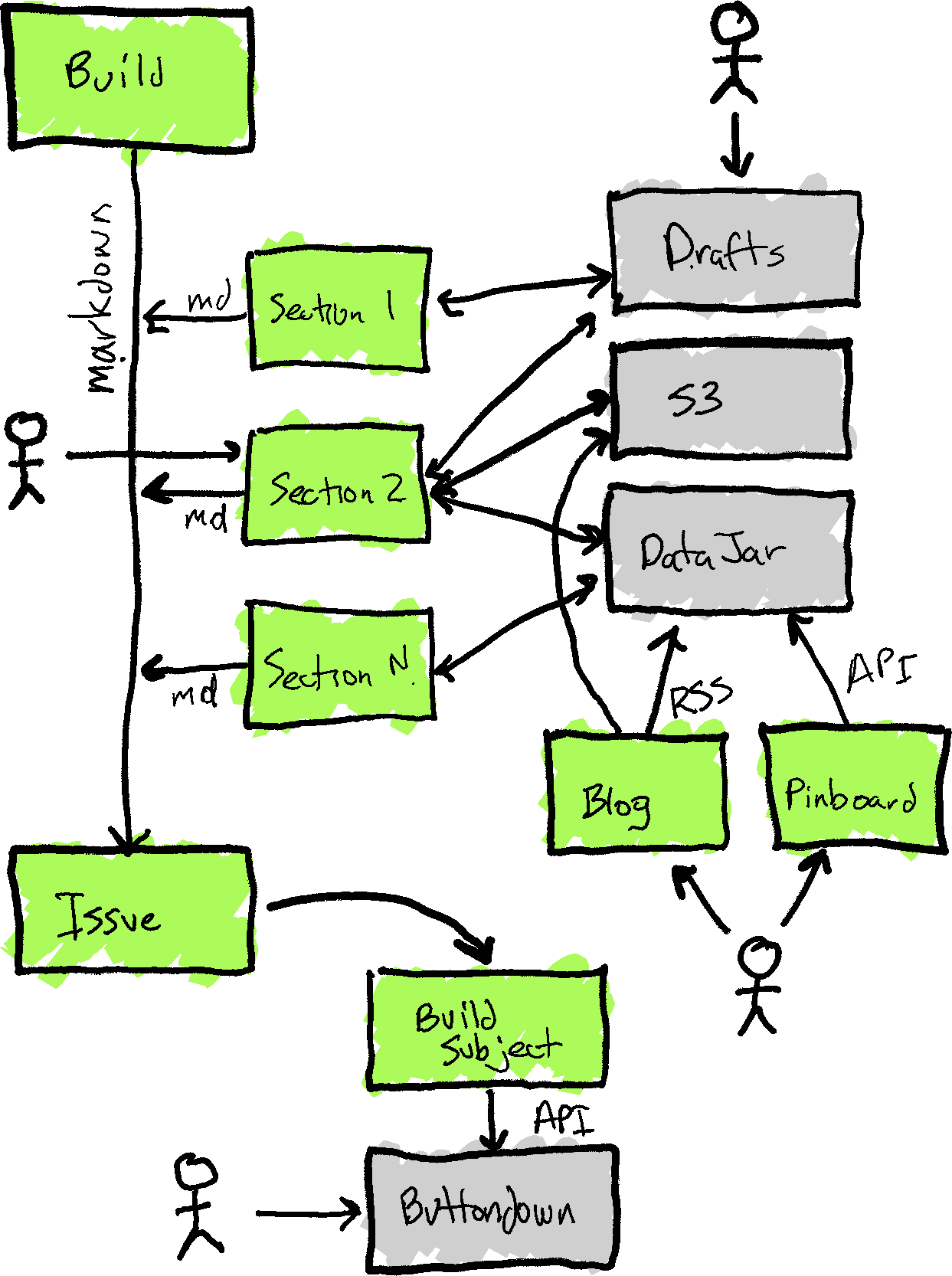
The easiest way to think of this is that the Build Issue shortcut has a list of other Shortcuts. It iterates through that list calling each shortcut. Those shortcuts in turn return a block of Markdown text. Once all shortcuts have been called, they are then combined into one Markdown block for final review and editing.
This approach is fundamentally the same as I have used since 2017. The biggest change since then is I call many more Shortcuts, and back then I pulled HTML since MailChimp required that.
The huge change that I’ve been making is that each section Shortcut is much more durable, and uses Data Jar to cache and manage data.
Software Manifest
Core technologies that are used for this include.
Shortcuts is where the majority of the work for this occurs and here is my current set.
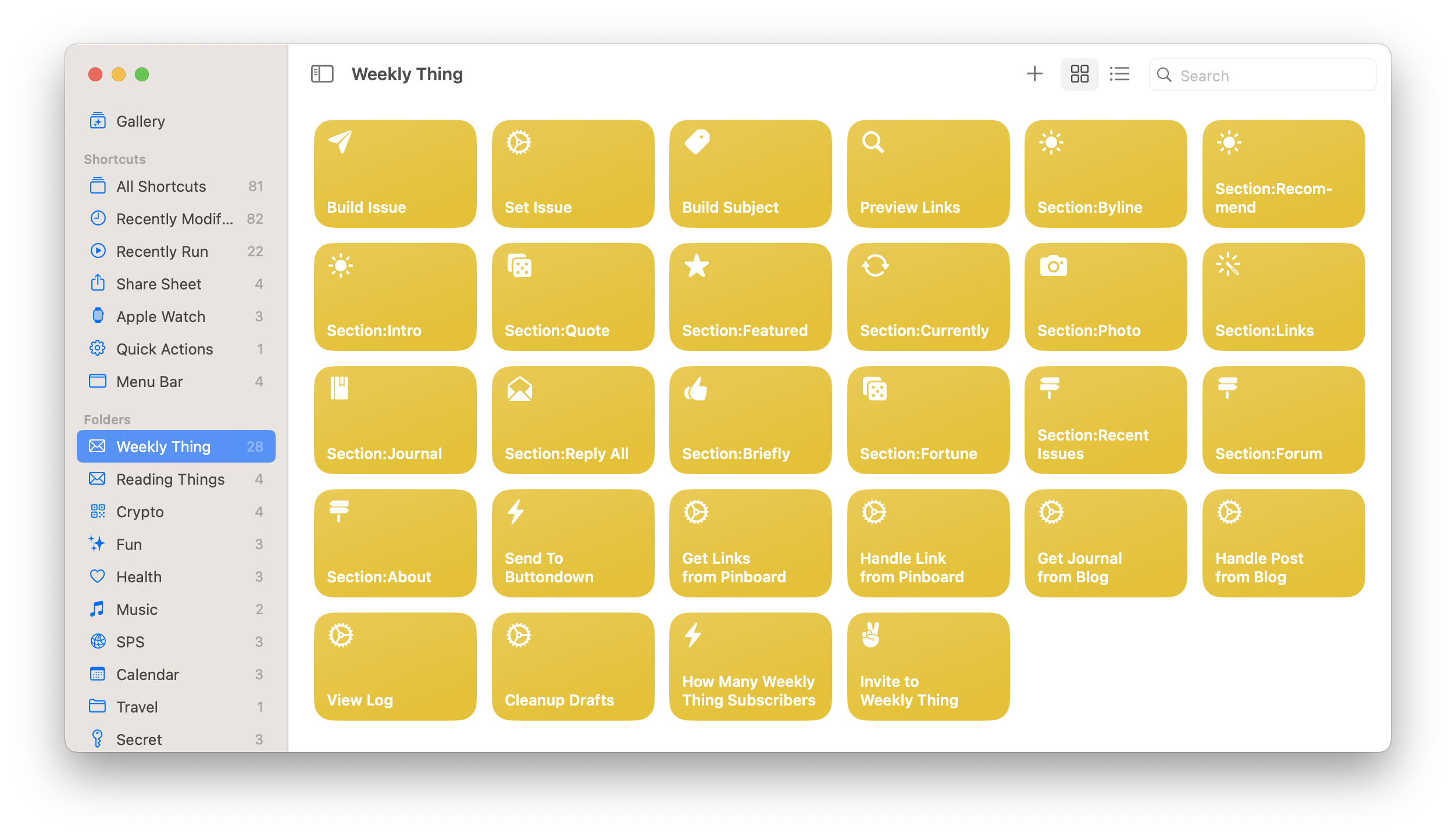
The “Build Issue” Shortcut is the one that collects markdown from all the sections and assembles it. You will see a lot of “Section:Name” shortcuts, those are the ones that are responsible for returning a section. Mostly the names make sense for a number of other utility shortcuts.
Data Jar
The other very important component is Data Jar, which you can think of like a database or cache for Shortcuts. Data Jar is a game changer for Shortcuts as it allows you to share and keep state between various Shortcuts. Here is what the Data Jar dictionary for issue 262 looks like.
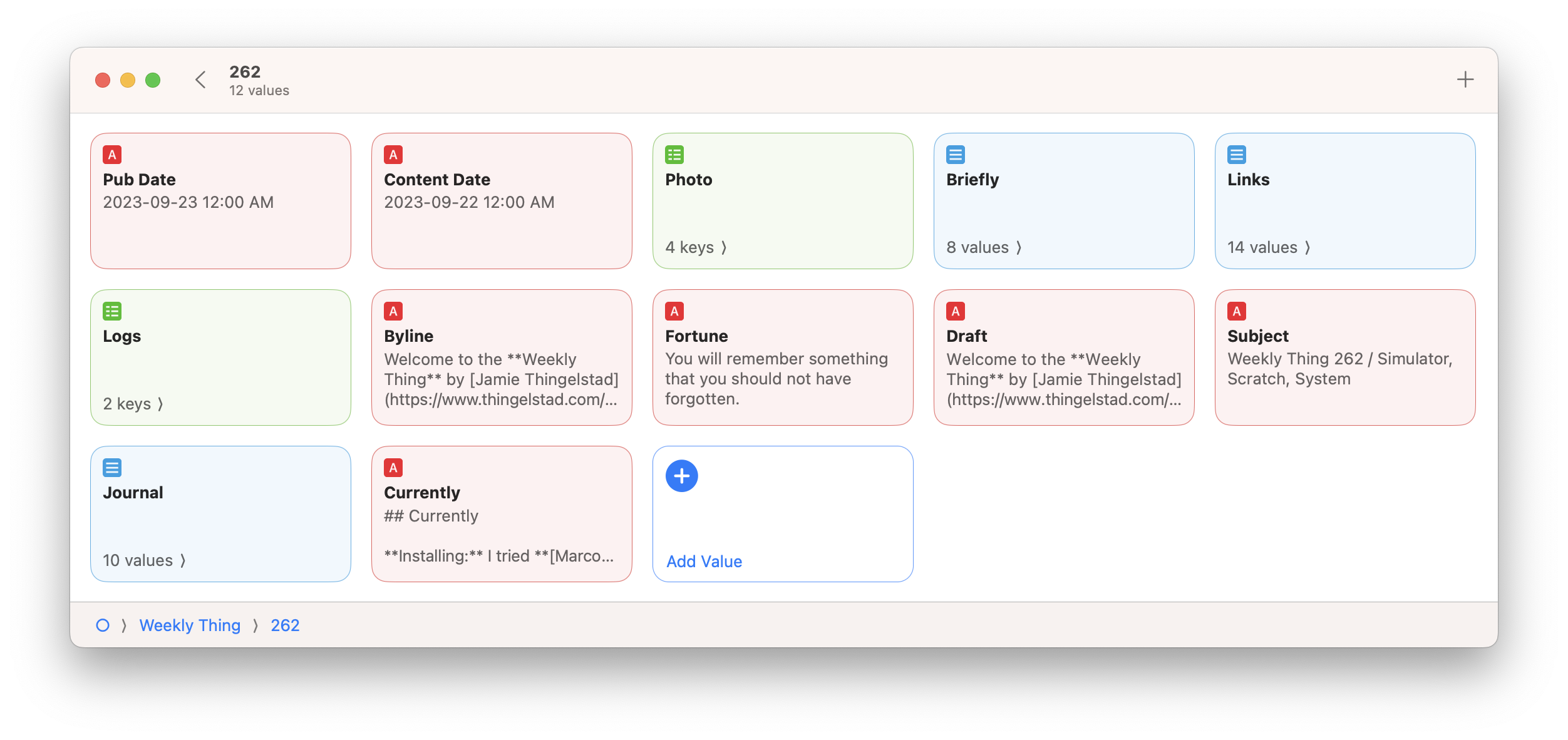
As much as possible the section Shortcuts use Data Jar to store anything they need. I’ll use a simple example with Section:Fortune. Each issue of the Weekly Thing has a Fortune that I set. The basic flow is:
By using this approach I can run this anytime I want to get that section final, and when I build it at publishing time it will not require any input from me. This makes things very durable as well since I can re-run the automation easily.
Summary
One of the takeaways I hope you have from reading this is that while Shortcuts seem pretty trivial, you can assemble them in interesting way with additional software to create very powerful solutions. Especially with add-ons like Data Jar and S3 Files you can do some incredible stuff.
I also think this is a good example of how you can apply automation to personal workflows. I try to use as much automation as possible to remove mundane components from my week. It is worth investing the time in Shortcuts or similar tools to see where you might personally benefit.
See discussion on Weekly Thing Forum.
This post is part of the Shortcuts Collection.
Smaller Images for Weekly Thing
In the Journal section of the Weekly Thing I include any blog posts that I’ve made for that week. To keep things easy, I’ve always just linked to the same image files that are used on my blog. That has never been ideal since those images are much larger than what you would ideally include in an email.
I decided to try and solve this problem in Shortcuts and the amazing S3 Files. The basic approach I take to getting blog posts into the Weekly Thing is:
To do this I would add another step after 3 to detect my own images in the posts, and do the following:
It wasn’t too hard to make all this work. After tweaking the regular expressions, and making sure that the replacement worked right it was working great.
Here is a snippet from my logs.
.)

.)

.)

.)

When I ran this to the Journal images in Weekly Thing 262 it was able to resize 28 images from an original size of 43 MB to 12 MB, saving 31 MB of download data!
This is a big win in two ways. First, when you open the Weekly Thing from 263 on your device will download way less data and need to use way less memory. Also, some email services apparently dislike it if emails reference images that are longer than 1,200 pixels on the longest side. Hopefully this little efficiency will also get finicky mail servers to be nicer to my emails.
This was only possible with the revamp I’ve been doing to my automation, and the ability to add this step in was a great result of those changes.
This post is part of the Shortcuts Collection.
Introducing Weekly Thing Forum
I’ve been sending the Weekly Thing for six years. Every week I will get a few replies from people about a specific article, topic, or comment from that week. Getting those replies is great, and sometimes I’ll get multiple replies on the same thing and think it would be interesting to extend this conversation. I’m putting the Weekly Thing Forum out there for just that reason, to create a broader dialog and to continue to learn together.
Plus I hope it is just fun, in an old-school Internet sort of way.
Before the Forum I have tried some very limited experiments to create some further dialog. I tried chat platforms like Telegram, Signal, SimpleX, and Wavelength Messenger. Only Telegram and Wavelength got more than a handful of people, and it just didn’t fit well. Chat platforms are very high frequency and that didn’t match well with the Weekly Thing. They don’t suit themselves to well thought out dialogue.
I played around with Reddit and Discord as well. Discord is way too much of a commitment. Reddit is crazy land. So neither of those were good fits either.
Then I got an email from a Weekly Thing reader, Barry Hess. Barry is one of the principles behind Good Enough where he and some other like minded technologists are passionate about creating principled products. Ponder is one of them. Barry reached out to see if I might want to use Ponder for the Weekly Thing. 🤔
The fun thing is that my friend Garrick Van Buren had already introduced me to Ponder via a group he had created. So I was familiar and thought it was a great, simple, clean and easy-to-use place to host a Forum. No privacy concerns. No algorithms. Just a place to connect with people in a thoughtful and meaningful way.
Over the summer I mulled this over and decided to give it a go!
So here we are, the Weekly Thing Forum!
I don’t know exactly where this will go. I think it would be great to continue dialog about articles that are in the Weekly Thing. It would be fun to do “Ask Me Anything” kind of things. It would be super to bring in additional perspectives. Overall, I’m hoping to increase connection and shared learning.
Thanks for checking it out! Thanks for reading the Weekly Thing! And thanks for being great!
Join the Weekly Thing Forum!
This messages is also posted in the forum.
Hosting Minnebar 17: How to Newsletter
Update: Sorry to say that this session had to be cancelled. We had some travel plans come up and we will only be able to attend Minnebar 17 for half the day. We are still going to do the POAP session though.
I’m going to host a session at Minnebar 17 on How to Newsletter: Lessons from 250 Issues of The Weekly Thing. This is my first time presenting at Minnebar in several years. I’m excited to do it again!
If this is interesting to you, register on the Sessionizer and indicate that you might attend this session.
I have been publishing The Weekly Thing since May of 2017. With 250 issues of the newsletter complete I’m hosting this session to share the common questions that I get about:
Additionally I will be covering:
This session will be focused on the creator and building. We will not be covering marketing, social media, or anything related to newsletter monetization or subscriptions.
With Labor Day and some additional travel, I decided to extend the Weekly Thing summer break for two more weeks. Issue 226 will resume on September 17th!
I just sent issue 219 of the Weekly Thing, which also marks the Five Year anniversary! It is also my first issue back after an unscheduled break. It was fun to get things going again. Subscribers got a PAOP token to mark the occasion.
I’ve been using Telegram recently to stay in contact with folks in Ukraine. I decided to create a channel for thingelstad.com and a channel for the Weekly Thing. If you like getting things in Telegram, there you go.
Update: I deleted these channels after a few months as they didn’t prove valuable.
I didn’t get the Weekly Thing done last night, but I got up early this morning and finished issue 190 with 28 minutes to spare! 😅
Four Years of the Weekly Thing
Today marks the four year anniversary of the Weekly Thing! Issue 1 was sent May 13, 2017. When I started this project I figured I would do it for a year and then see. Now it is four years later and I’m still enjoying it.
Here are some learnings I would share.
And now onto the years ahead!
1,000 Subscribers
I’ve had a “soft” goal for the Weekly Thing to get to 1,000 subscribers and it got there today! Plus it is fun that Buttondown sends a note like this.