
Traineo

While reading TechCrunch about a week ago I saw a headline about a “web 2.0” community-centric fitness site called Traineo. This hit all my hot buttons since the “geekery” sounded cool and I’m looking for something to help me along my path to getting smaller again. A couple of days later I finally got to the site, signed on and I’ve been really impressed. I’ve decided to start using this to track my fitness progress instead of my decade-plus venerable Lifeform software. Lifeform is still the best food logging software I’ve ever seen, but the rest of it I can do it Traineo easier and it’s a service with community.
Traineo provides some buttons for you to put on your site and such, you will see one on my site showing my progress towards my weight goal. Of the features that I particularly like is the motivator system where you pick four people that will get weekly reports on your progress.
I’m gushing a bit, the service isn’t perfect and I hope to see it improve significantly, but so far I’m really enjoying it. Check out my profile on Traineo. If you’ve been looking for a site to help you with your fitness goals and connect with a community, this is the place to go.
Cha-Ching
 The
other night while catching up on my RSS feeds in
Reader I stumbled upon a small software
project for the Mac called
Cha-Ching. Cha-Ching is a
product from Midnight Apps that intends to take on the personal finance
heavyweights like Quicken. It’s not open source, but it reminds me of
Firefox finally providing real competition for the lagging Internet
Explorer 6.0 and pushing innovation in the market, and this is a market
that needs innovation.
The
other night while catching up on my RSS feeds in
Reader I stumbled upon a small software
project for the Mac called
Cha-Ching. Cha-Ching is a
product from Midnight Apps that intends to take on the personal finance
heavyweights like Quicken. It’s not open source, but it reminds me of
Firefox finally providing real competition for the lagging Internet
Explorer 6.0 and pushing innovation in the market, and this is a market
that needs innovation.
Cha-Ching is far from being able to supplant Quicken, but it’s sleek and well done. It feels enjoyable to use, and at only version 0.4 there is much to hope for. My hopes are with the Midnight Apps crew to build a product that will have elegance and simplicity, with rich and powerful features.
Operation Junk Mail
I’ve decided enough is enough. Perhaps it’s just the holiday season, but our mailbox has been overloaded with mail order catalogs. Sometimes as many as ten a day. It’s insane! I’ve decided to declare a War on Catalogs!
I’ve had good success so far. I’m going to the website of every company that we get a catalog for and submitting a customer service request. So far most are responding promptly. I’m keeping a list of who I contact, when and any relevant tracking numbers so I can escalate if I need to.
Hopefully our recycling will go down, our mail carrier will be happier, and we’ll have less junk thrown in our face to buy.
Wii Component Cables
My component cables arrived for the Wii today. I finally was able to move off the incredibly lame composite connection and 480i to a nice crisp component connection and 480p. I know that this is a much better setup, and I eagerly plugged it in and decided to get my camera out and do some before/after comparisons. While I can tell the difference, it’s not as striking as I expected. These shots are all taken from the Wii menu screen. I took photos of the “disc” channel and of the Mii channel. I also took a photo of the Wii settings button on the lower left corner of the screen. See what you think.
480i composite of Wii logo in the Disc Channel

480p component of Wii logo in the Disc Channel

You can tell that the progressive scan smooths out the fonts a bit.
480i composite of Mii Channel
480p component of Mii Channel
Great example that when you are not “super-zoomed” into the image, you can’t really tell much of a difference.
480i composite of lower-left Wii settings button

480p component of lower-left Wii settings button

This extreme zoom shows the best the differences between the two settings.
There are other write-ups about the component cables that show the differences.
USB Drive Roundup
At the end of August I picked up a new USB thumb drive that would perform at a pace capable of running applications. I got the OCZ Rally2 2G drive and was very happy with it. One of the only deficiencies of the drive was that there was no way to attach a strap to it, and that proved fatal. On a business trip a couple of weeks ago I lost it. Huge bummer. I also lost a bunch of data that wasn’t recently backed up. Bummer ^ 2.
I went on the hunt for a replacement and decided to try some non-traditional form factors. I was happy with OCZ, and they had some good rebate deals on NewEgg so I ordered up a variety. I got the OCZ Rally2 4G, Mini-Kart 2G and Roadster 1G.
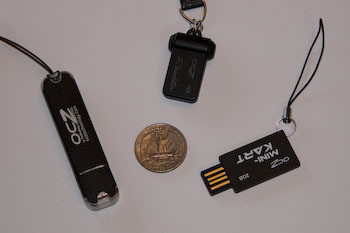
The drives fit a bunch of different sizes and use cases (pictured here with a quarter for comparison).
OCZ Rally2 4G
OCZ has revised this drive from the one that I bought a couple of months ago. They added a lanyard strap to keep the drive from getting lost, however the cap still doesn’t have anything to attach it to the drive placing it at risk of getting lost. The drive is spacious and it turns out respectively faster than even the last one. The last version (2G) maxed out at 9.5M/sec write and 19.7M/sec read. This new version ramps it up to 12.8M/sec write and 22.5M/sec read!
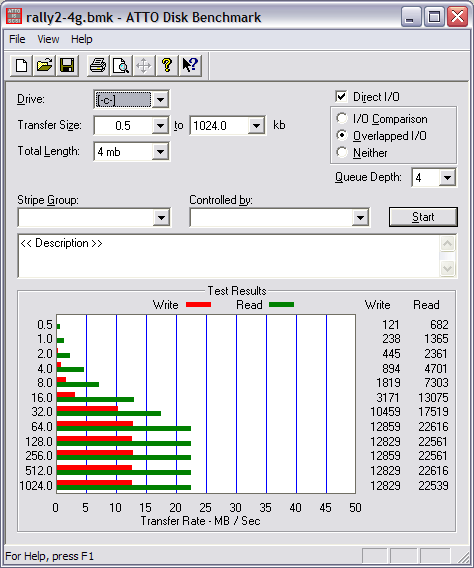
The traditional form factor makes this drive still not great for constant road warrior use, but the size is great for moving ISO images around and it’s got the speed to keep up.** **
OCZ Mini-Kart 2G
The Mini-Kart is a trip. It is slightly thicker than a credit card, and has a non-traditional USB plug that sits in the USB slot. It could be placed in your wallet pretty easily, and doesn’t require any protection on the plug. It’s big enough for most applications, and sports a nice blue LED on the end to indicate activity. I did a speed test and was pretty impressed with the performance for a compact unit. It topped out at 7.3M/sec write and 13.2M/sec read.
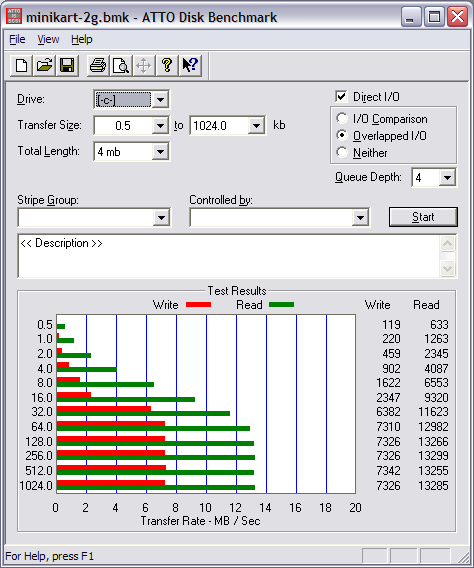
This drive should be great for road warrior usage, but I worry about the exposed connector and I think it could be snapped if it’s flexed too much. However, it is very solid and I’m sure would take a big beating.
OCZ Roadster 1G
The Roadster is the drive made for the road warrior. It is a clam shell design, collapsing the USB plug in on itself making it both small and exceptionally tough. I love the design, and love the size. It can be attached to your key chain and forget about it. However, the drive performs miserably. This is a big let down as this is the perfect drive for ultra-mobility, but it’s speed limits its viability for mobile applications. The drive posts a pretty sad 2.3M/sec write and 9.8M/sec write. Very sad since the average “give-away” free USB drive performs about this well.
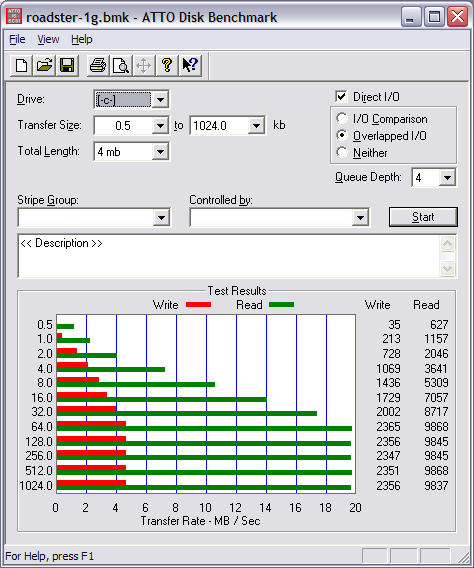
Great form factor, but the performance is very limiting.
Conclusion
I love the Roadster’s design, but it’s speed is a problem. I’ll likely use the Mini-Kart for my mobile applications since it has the speed and a reasonable form factor. I’m very pleased with the Rally2 for moving large data around, and am going to give it a try using it for Vista’s speed boost feature as well.
Mazie's Kitchen
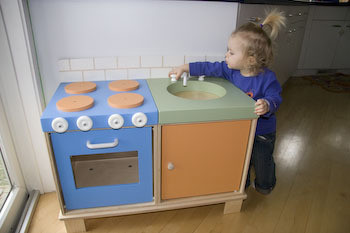
I got to play Super Dad today and put together Mazie’s christmas present. December 3rd? Sure – she’s 18 months old – it’s Christmas! 🙂 Tammy and I got her a “kitchen thing” for Christmas and have coordinated with her Grandparents, Aunts, Uncles and other relatives to get presents that go along with it.
The kitchen came in 4 boxes, with lots of assembly required. Just a bunch of peices of wood. Tammy suggested that she put it together while I was in NY last week. I thought about that for a moment, and I didn’t like it. Assembling the “assembly required” Christmas present is a Dad job for sure – and I didn’t want to be deprived of my fatherhood rights.
I got a bit frustrated at the beginning. Not too frustrated though, I’m pretty sure my language was clean the entire time. I put every joint together with added wood glue. This thing will be around for generations to come. She is having fun with it and it will be nice for her to get her pots and pans and other accessories to go with it.
Mac Pro in the House
About 2 months ago my primary workstation died. The machine was behaving very flaky, not posting from time to time and requiring my to jumper the Clear-CMOS on a routine basis. After a couple of times doing that it gave up the ghost and refused to post ever again. I’m fixing it, but it broke my back on home brew machines. I’m just not the kinda guy that wants to open my machines case on a regular basis. Particularly my primary machines that I depend on for a variety of applications and uses. It was time to ditch this thing and move on.
A faithful reader of my website would know that I’ve been on a string of Mac purchases lately. The most recent computers I got were a MacBook and before that an iMac G5. Why break the trend? I decided to get a Mac Pro.
It all started very benign. I just started looking for a new box and scoured Dell and a variety of other sites. I wanted something with serious power, lots of memory, big graphics and growth for the future. Regardless of how you feel about Apple, if you are looking for a great machine at the high-end you need to examine the Mac Pro.
Mac Pro
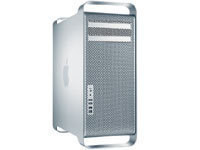
I placed the order and got the machine on Halloween. I ordered it with the 2.66Ghz CPUs, the upgraded ATI Radeon X1900 XT video card and the Bluetooth option so I could go wireless on keyboard, mouse and eventually headset for Skype. I got it with 1G of RAM installed (2 512MB FB DIMMs) and ordered another 2G of memory, totaling 3G.
The hardware is very impressive. Taking the side panel off (which is ridiculously easy, yet stable) shows a very well designed machine. The drive bays are elegantly arranged with no cable messes. I dropped 3 additional SATA drives in it to fill it up. The 16 (!!!) memory slots are on a daughter card that easily slides out for adding memory.
I powered the machine on and it is very quiet. The 10,000 RPM boot drive I have in it is the loudest thing in the machine. This is a machine that was completely thought through in all aspects. Two, big thumbs up.
I’m particularly pleased that I’m pretty future proof. I can take memory to 32G if I wanted to and it’s possible to upgrade the dual-core Xeon’s to quad-core and go 8-way with the existing motherboard. Yeah!
Cinema Display
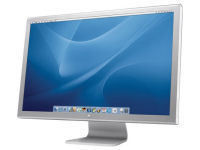 I'd picked out my new machine and I already had the dual Dell 2005FPW
monitors from the previous machine. I could have used them, but I had to
admit that I wasn't that happy with them. I found the vertical height
(1050 pixels) to be confining. When using these monitors I always felt
like a 6' man standing in a room with 5' 6" ceilings. If I was going to
get completely happy with my home workstation a new monitor was in
order.
I'd picked out my new machine and I already had the dual Dell 2005FPW
monitors from the previous machine. I could have used them, but I had to
admit that I wasn't that happy with them. I found the vertical height
(1050 pixels) to be confining. When using these monitors I always felt
like a 6' man standing in a room with 5' 6" ceilings. If I was going to
get completely happy with my home workstation a new monitor was in
order.
An Apple Cinema Display was needed, and I decided to go all out with the 30" version (2,560 x 1,600 pixels). The real-estate on this thing is massive. Acreage! This is the largest monitor I’ve worked with and I really like having that much contiguous space. There is something to be said for having multiple monitors, I think it’s a necessity at work where Outlook lives permanently camped on one. At home however the ability to launch Lightroom or Final Cut Express on a huge single display is just amazing. I can view my digital photos at near 1:1 with this display.
Software
When I ordered the machine I was thinking I’d probably just Boot Camp it and run Windows Vista full time. I’m changing my mind. I’ve been enjoying Mac OS X a lot on my MacBook and while I’ve got a lot of software hurdles to get over, I’m going to give it a try full-time. Many applications I have will work in both, but I’ve had to rethink a lot of thins. There are also some applications that are either absent or notably better on Windows (Garmin Mapsource, Quicken) and I’ll either run those in Parallels or Boot Camp. I am going to put Boot Camp on it and Windows Vista just to have it for the occasional times.
I’m immensely happy with everything about this workstation. I recommend everyone, not just casual folks, check out these new workstations from Apple. As I take inventory in the house now, excluding the servers, Macs now outnumber Wintel boxes by 3 to 2. Pretty amazing.
Butter Bakery
Tammy and I checked out a new restaurant this weekend. Butter Bakery is in south Minneapolis and serves a brunch menu as well as traditional baked goods and coffee. We had lunch there on Saturday and the food was so good we returned for breakfast on Sunday.
The bakery items are all great. However, most notable was the pancakes. I have no idea what they do to their pancakes but they are amazing. They are gooey, and incredibly flavorful. Go there, and get some pancakes!
Mazie Conquers Stairs
Lately most of the news on the Mazie front has been about new words. Lot’s of new words. She can usually get her point across now, at least to Mom and Dad, and she’s picking up new words faster and faster.
However, a couple of days ago she made it down both flights of stairs in our house without any help. Obviously Mom and Dad are surrounding her with hands ready to grab her if she falls. She’s really careful, and braces herself to the wall but makes it pretty solidly down each stair – one step at a time.
She’s a long ways from navigating steps without help, but she sure does have fun walking down them. She gives a triumphant giggle when she finishes all the steps.
Dad Skill #138
Singing the A-B-C song backwards. (Wait for the 3rd verse…) Try it. It’s harder than you would think.
This skill courtesy Ralph’s World.