
iPhone Screen Broken
On Thursday of this week I experienced a disaster. I got a phone call and while taking my iPhone out of my pocket it slipped and I fumbled it ever so oddly, culminating in it hitting the plastic arm of the chair I was sitting in. I flipped it around and to my horror the glass had cracked!
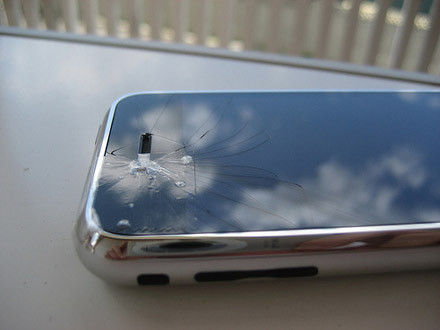
The image above is not my phone. I was not able to get a picture of it. The image is from GeckoAndFly.com under the Creative Commons license. See the post where this picture originated.
It was really odd. I had dropped my iPhone before, and in much worse situations, and everything was fine. This was a minor hit, and on a plastic surface no less. I think the issue was that it hit exactly where the cutout for the speaker is, on one of the corners. It would make sense that this would be one of the weaker points in the glass. Same exact hit that is in the picture above.
Distraught at my lack of a perfect iPhone (it worked fine with the broken glass BTW) I headed to the Apple Store. I wasn’t optimistic that it would be replaced gratis. Upon arriving my assumptions were proven out. Apple replaced it with a “replacement only” unit that cost $249. A big $50 savings off of a brand new unit, and you have to immediately hand over your broken unit (hence no picture). The money aside, the replacement was flawless. I came home, docked it, and iTunes quickly restored exactly as my previously broken one was.
Pleo Hatches
After months of waiting Pleo has finally arrived! Pleo is the first robot from Ugobe.

It seems not many people had pre-ordered Pleo (according to Jyte). Of course there were only 2,000 of the special “First Hatch” editions available.
I charged Pleo’s batteries and woke him up for the first time. So far I’m pretty impressed. Ugobe has done a great job of getting Pleo to convey a variety of emotions. I took him to work today and people had a great time playing with him. He’s already learned several new motions and actions. I had read another blog post saying that they thought he was really loud. Granted you can hear the servos, but I don’t think they are too loud. Engadget has a nice write-up on Pleo.
I’ll post more on my first few days with Pleo later, perhaps with some video.
Mount Your iPhone While Flying
Ever since I’ve gotten my iPhone I now have a new routine before I travel. I make sure to sync the iPhone with iTunes and get all the most recent episodes of podcasts, and maybe a movie and some TV shows while I’m at it. Since the iPhone is my all-in-one device, it’s great to be able to load up so much content on it and head to the airport.
The iPhone is a superb device to watch video on. The screen is bright and large enough to enjoy the show. Unfortunately, all is not perfect. You really cannot expect to hold your iPhone for an hour while you watch a show on a flight.
The first part of this problem is that the iPhone itself is aluminum and thus relatively slippery. I have the incase cover for my phone that is nice and grippy and I found that I could prop my iPhone on my tray by placing something behind it. This worked okay, but resulted in looking down at the seat tray for a long time, and some neck pain to go along with that. So I pondered this for a while and came up with an alternative.
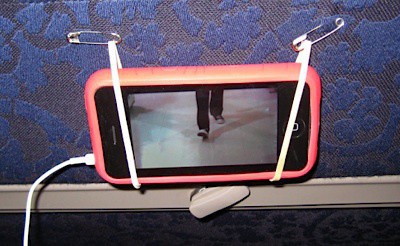
I got all MacGuyver on this one. The ideal scenario is to have the screen right at the headrest of the person in front of you. How to do that? Two rubber bands and two safety pins later and the problem is solved.
If you don’t have the Incase cover you can just make the rubber bands tighter to hold it in place. You’ll want to make sure and get the safety pins fairly level. After mounting, this worked great!
Fire up a movie, recline and enjoy!
Open Thread: Presenting at Code Freeze 2008

I’m presenting at Code Freeze 2008 in January. The title of my presentation is Innovation in Product Development.
Everyone wants to have the next hot product. We are constantly “pushing the envelope” and “thinking out of the box”. We have the aspiration, but in many cases it doesn’t happen. In this discussion we will review key aspects to fostering innovation in a development team, creating room to play and ultimately making great products.
I’ve got some ideas for my presentation and a theme I’m thinking of winding it through. However, I’m curious if you all have anything to say on this topic. What do you think drives innovation in product development? What are the key contributing factors that you see?
Let me know what you think.
Linksys WTR-54GS: Making Travel Better for Internet Junkies
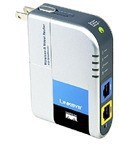
I recently picked up a Linksys WTR-54GS travel router based on the positive recommendation of my friend Chris. He had gotten one before going on a big trip to make sure that he had WiFi in all the locations he wanted it and it worked really well.
I’ve considered getting something like this for a while, but never had a need that pushed me over the edge. The iPhone was the tipping point. When staying in a hotel I wanted to get my iPhone online and even if a hotel does provide WiFi they usually limit each room to one device (via the MAC address). By using a travel router like this I can put a small network in my room with several devices and not have to pay any additional fees. I’m using it right now in my hotel room with my Dell laptop, MacBook Pro and my iPhone all online. It works really well.
As an added benefit the WTR-54GS has a firewall integrated into it so you can protect all of your devices from other hotel guests. I’ve noticed lately that if I launch iTunes in a hotel I could see a large number of peoples shared music. Tsk tsk. The firewall in the travel router will keep me protected from such things.
The WTR-54GS itself is a nice package. It has an integrated power supply so there isn’t any extra junk for plugging it in. It comes with a nice, very packable, 10-BaseT cable. It’s small and can easily be thrown in your suitcase for any trip. One of the unique features of the Linksys model is that you can even bridge from one WiFi network to your own, thus still getting the advantages even when the hotel offers only WiFi.
If you travel with any regularity, and are an electronics pack mule like me, you should consider grabbing one of these.
Crash Pen
It seems that I lost my Crash pen today. This makes me very sad. I’ve had this pen for a few years and I think it’s just supremely cool looking. I’ve even ordered parts for it in the past.

I think I’m going to have to order a new one. Bummer. I guess on the bright side at least I can order a new one.
Copyright Notice in RSS Feed

If you are reading thingelstad.com via the RSS feed you will notice that I have added a copyright notice creative commons license to the feed, along with a digital fingerprint and for fun the IP address of the machine that pulled in your RSS feed. I’m doing this to fight back against website hijacking.
I’m noticing a lot of my content being stolen via my RSS feed and then republished on spammer websites. This is a slimy practice and is a growing trend. Lorelle wrote on this at some length recently. I decided to do something about it with the CopyFeed WordPress plug-in.
I went out of my way to just put the copyright notice creative commons license in a regular HTML block at the end of the post. I decided to post about this to encourage others to consider adding this if their content is being stolen, and to let you know why the copyright notice creative commons license has appeared.
Stay Focused in WriteRoom

I’m writing this post on a plane. I’m drafting with MarsEdit to post later. There isn’t much interesting about that. What is interesting is checking out people looking at my computer screen. Why? It looks like I’ve time warped back 20 years.
I’ve been doing almost all of my writing for the site using WriteRoom. WriteRoom is a Mac application that defers to a simple, distraction free writing environment. They describe it best as:
For people who enjoy the simplicity of a typewriter, but live in the digital world. WriteRoom is a full-screen writing environment. Unlike the cluttered word processors you’re used to, WriteRoom is just about you and your text.
Here is what my screen looks like right now.
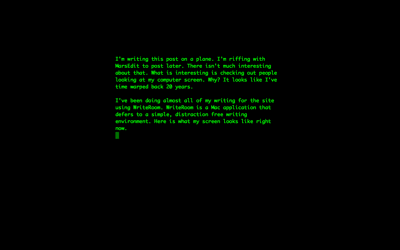
Pretty whacky huh? That’s WriteRoom. When you launch WriteRoom your entire screen goes black, and you just type. All of those other applications, and even the user interface of the editor itself fades to black. You just write. So simple it took a decade to make.
There is a lot more to WriteRoom. For example, it never has you typing at the bottom of the screen. Your actual typing is always in the middle. Seems like nothing, but is really nice. In short you can customize the heck out of it and make it the experience you want for editing. If pure text mode isn’t your thing, it even has a minimal rich editor.
Ya know the thing I love about WriteRoom? It’s the same thing I love about Quicksilver. As well as dozens of other applications on my Mac that are written by very small independent software developers. It’s different. It’s elegant. There is so much fresh and new thinking going on in the independent developer world of the Mac. It’s a great time to be a Mac user.
MarsEdit

I’m totally geeking over MarsEdit right now. MarsEdit is the desktop blogging client that I recently started using with my site. I’ve considered moving to a desktop blogging client instead of typing in the text field of a web browser for a while. I never made the jump though since I had a hard time finding a tool that I really liked. MarsEdit seems to fit the bill really well.
The first criteria for me was full support for WordPress, particularly the native tagging feature added in 2.3 and thankfully MarsEdit ticked this box right away. The other major editor I worked with at length was ecto and it sadly didn’t do this yet. Tsk tsk…
So why shell out some good PayPal dollars for a desktop blogging client? Here are my reasons…
Editing
Can we really think that editing even more than a single paragraph in the text field of a browser is passable? Even with great add-ons like TinyMCE it really is only workable for a simple comment at best. Using a desktop blogging client I get a much more powerful and workable editor.
It’s not just doing the editing on the Mac or PC either. MarsEdit is using the editor you like for what you want to do. For example, I’m doing almost all of my blogging in the distraction free, completely uncluttered environment of WriteRoom. (I’ll do a post on WriteRoom soon too.)
Next time your typing a post in a text field, try putting in a tab. :-)
Drafting
I’m a big “drafter”. I have 10 or more blog posts in draft status with different levels of completion at any time. Sometimes it’s a title with a three word reminder. I may have a long post that has been refined a few times waiting. I haven’t found any web-based admin interfaces that make working with multiple drafts really nice.
Live Previewing
One of the great features of MarsEdit is the ability to have the text open and editing, and in another window next to it have a live preview of the rendered HTML. This makes blogging in raw HTML actually work.
Why blog in HTML? I shrugged off this recommendation for a long time. My opinion was that I shouldn’t have to write in HTML anymore than I should have to know the ASCII codes for all the letter I’m typing. However, I’m a convert. The control it affords you, and the ability to avoid the damage that a rich editor would do to embed codes is a big win.
Other Stuff
There are other reasons to use a desktop client that are less about writing to me. You can post to one of several blogs you have in one tool. That’s great, if you have multiple blogs. This means I’ll likely actually put something up at MinneLightroom now and again.
I give MarsEdit two thumbs up. If you are a blogger, and you use a Mac, go download the demo and give it a go. As they say, YMMV.
Website Updates (Nov 2007)
I just finished a pretty long session or upgrades and improvements to thingelstad.com. Here are some new things to check out.
Gravatars
I actually implemented Gravatars a while back, when Automattic bought them. But it deserves a special highlight and I improved the implementation now. If you comment here, register for a Gravatar so you can get your picture next to your comments!
Feed Improvement
Nothing too big here, but you will now see tags and related article links in the RSS feed. I know a lot of people use that feed exclusively so I think that may prove useful. (Thanks to Simple Tags.)
Ratings
You can now rate all posts on the site using a 5-star scale. You’ll see the rating tool around any posts. Just click to give it a rating. Go ahead and start with this post. Top rated posts are highlighted on the front page. (Thanks to Lester Chan’s WP-PostRatings.)
Articles
I setup an article page on the site where certain posts are highlighted and called out. This allows me to give special positioning to certain things I write. (Thanks to Alex King’s Articles Plug-in.)
Polls
I’ve added polling functionality, which I used to have a long time on my site. It isn’t going to be permanent in the sidebar, but instead just embedded into different posts. (Thanks [again] to Lester Chan’s WP-Polls.)
Theme
The hardest maintenance item you won’t even notice. I updated the theme I use, blog.txt, from 3.1 to 4.1. I don’t think there is any noticeable impact visibly. I had to go in and rehack in all my theme customizations though. I really wish WordPress made that easier. Thanks to Scott Wallick for making such a great theme. I really can’t say enough good things about this theme.
Filling Out Tags
Last is a bunch of manual labor. I’m slowly getting tags applied to my archive. There are hundreds of posts that were made before my blog had tagging. This is getting filled in slowly but surely.
Enjoy the updates!