
Getting ready to tap a maple tree!
Pragmatic Studio: Rails Studio Graduate!

I graduated! Or, well, at least I got the certificate!
I finally took the plunge this week and took Rails Studio after thinking about it many times. I blogged a day-by-day account – day 1, day 2, day 3. It’s been a long, long time since I’ve coded anything significant and I’m hoping to get a bit closer to it in some projects coming up. This class was my plunge into Rails.
While I’ve been away from the keys for a while, I’ve been very familiar with a number of frameworks and have personally seen teams struggle and thrive in different frameworks. I’ve really taken note of the “weight” of a framework and the effect it has on a programming team. Something that I think is far too often ignored. We focus on scale, “enterprise readiness” (another topic to post about) and forget that at the end of the day a bunch of developers have to live inside this thing – and it needs to be nice and hopefully fun.
Now that the class is over, some thoughts.
Ruby
I came into the class feeling that Ruby was awkward. I had looked at a reasonable amount of Ruby code in examples and books, and had always found it confusing. I guess it would be similar to looking at Perl code and seeing $_ for the first time. The Ruby code I looked at had these strange :symbols and odd syntax that just made it seem foreign.
The reality is Ruby is a bit different. Rails has a strong concept of convention. Learning more about Ruby I realize that that admiration of convention starts in Ruby and extends in Rails. I started to enjoy the fluid nature of the language more and more as our class went on. Dave Thomas said that when he teaches people Ruby there is a great moment about half-way through the class. “People start to smile.” I can see that. Ruby is a language that encourages you to just try things. The smile comes because a lot of times, it works.
I left the class with more respect for Ruby and a feeling like it was a language I could live with for quiet a while.
Ruby on Rails
I was really impressed with Rails. I’ve talked with a lot of people, over a lot of projects, about Rails and understood the benefits, but this was my first up close experience. I found myself very happy with the Rails framework and particularly impressed with how much more productive it was than other frameworks I’ve seen.
It’s really clear to me that many of the projects I’ve thought of would be very achievable in Rails. This validated the premise I’d held for a while with less specific knowledge. I was also impressed with the progress that Rails has made through 2.0.2. Mike and Dave did a good job of highlighting those improvements and updating the training.
I’m pretty excited to start on a small project on my own now. I’m also hopeful that a new version of Agile Web Development with Rails comes soon updated for Rails 2.0.
Rails Studio
The studio was great. I highly recommend the training and think that Mike Clark and Dave Thomas did a great job with the class. And, very importantly, Nicole Clark did a great job with all of the logistics. Everything was as good or better than expected and I thought the class materials were top notch.
I particularly enjoyed the structure of the class, working through one application all the way through to deployment. During the class Mike and Dave would occasionally do a “customer routine” where one of them was coding and the other was the fake customer. That was cool to see how well Rails handled quick little iterations.
I really enjoyed Dave’s sidebars on various topics Rails. While I’m sure it took us off schedule a few minutes, Dave is incredibly insightful and his comments were always interesting and usually quiet funny as well. “Ship it!” “Get Seriously RESTful!” I highly recommend Dave’s blog. It’s a good read.
Yes you can!
The best thing about Rails Studio for me is that I feel like I can personally build something interesting again. It’s easiest for me to explain this with an analogy. When I was a teenager, I knew a few guys that really knew how to fix cars and make them work. This was a critical need for a teenager from North Dakota with a $100 pickup. However, all these guys had no ability to fix a car with fuel injection. At some point the web got fuel injection and I lost the confidence to build something even small.
Luckily Wordpress has filled that void for me allowing me to blog away, and at time bend it well out of it’s prime area to get something out. I left the Rails Studio feeling empowered and capable. That I could create something cool and interesting, functional and useful. That is definitely worth the price of admission.
I also left feeling that I need to do a forced rethink of how I look at building applications. I know the words behind agile development, but I don’t think I practice it very well. I get enamored with a single technical problem and dive right down rabbit holes often never to return. The perfect case in point is Road Sign Math. I created a complete schema for the whole thing, plus completely new functions, in beautiful SQL code without a single line of front-end code or even a single web page.
The thing that I saw so clearly in Rails is the ability to develop around a story. And start with simple stories. Don’t build your data model, build a story. This doesn’t come naturally to me and is something I’m going to work hard to change.
I think I left my super fancy iPhone headphones on the last plane! Argh!
Wii Suggestion, Flickr!
One of the great things about the Wii is the built in support for the Internet. The freely available Opera browser for the Wii is perhaps one of the most usable “couch browsers” I’ve worked with (although, still not great to use).
Apple TV Take 2 added a really great Flickr channel so you can see your friends photos on Apple TV. It’s a lot of fun. This seems like a total layup for the Wii. The Wii already has an imminently useless Photo Channel that requires cards and such. How about a Flickr channel to gather friends around in the living room? Or even just a great screen saver for the Wii!
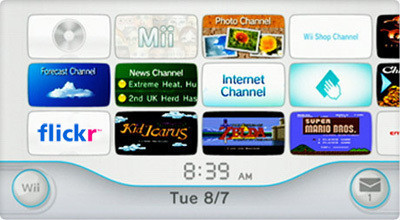
Looks great to me, how about it Nintendo?
Tip: Paying Attention with Laptop
I’ve spent the last two days in this all day Rails training class. Here is my #1 tip for helping to stay focused. It’s really simple, just a couple of mouse clicks.
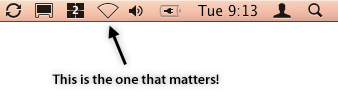
Just go and “Turn Airport Off”. No Internet, less distractions, more focus.
Pragmatic Studio: Rails Studio Day 3

Today was the last day of Rails Studio. Dave and Mike took us through the finish line with a packed syllabus. We took our event application all the way through deployment.
Our final day was a little rushed. I would guess we had fallen about an hour behind the agenda. We covered the final leg of Rails stuff including completing the ActiveRecord discussion through to many-to-many relationships, the magic of filters and a great overview of using partials and AJAX in our applications.
Probably the only oversight in the class was the coverage of testing in Rails. Due to schedule, we had to cover all of the rake test world in an hour. An hour isn’t a lot of time to cover what is really a pretty complete and powerful test environment that is built right into Rails. The oversight here was more pronounced, as early on testing was highlighted as one of the critical things you have to do in your app. We really didn’t get enough coverage of this. I wouldn’t want a fourth day in the class, which is likely what would be required to cover testing well, so I guess a hurried overview to get you started is probably the best that can be done.
To end the class we deployed the application via Capistrano to a production server. The Capistrano system really impressed me as being elegant and extensible.
Rails API using Fluid SSB
I’ve been diving big into Ruby on Rails this week with this class I’m taking. One of the things I found right away is you need to have the Rails API documentation very handy. The main site is api.rubyonrails.com, and frankly it’s horrible. Luckily there is a great alternative at RailsBrain that uses AJAX and all sorts of spiffy fun to make the API so much more usable. Today though I was getting frustrated because I had a slow internet connection and things were taking forever. Enter the solution, a site-specific browser.
My friend Kent came up with this idea, so credit to him for it, but I know he’ll never blog about it and I want to share the love. RailsBrain allows you to download the API documentation as a zip file. It is simply a collection of files and can be served without a web server.
Unzip the files to a location of your liking and then launch fluid. Here is the setup window. For extra fun, I took the logo image off of RailsBrain to use as the application icon.

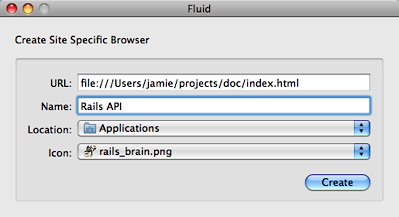
After doing this hit create and you’ve got a brand new shiny application that runs local, will work offline, is never going to be slow, and can be launched easily via your launcher of choice.
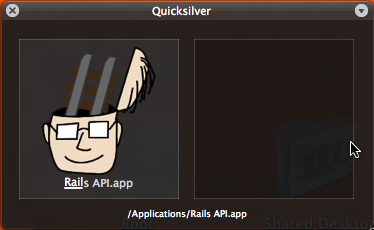
Plus, you can now alt-tab to it easily. Wow! Great idea Kent! This is really great, and it is blistering fast!
Pragmatic Studio: Rails Studio Day 2
Today was day two of Rails Studio. Dave Thomas and Mike Clark really ramped up the fire hose today. We continued working on our project site and today worked through creating our own forms, working through ActiveRecord and creating relational mappings and passing things around from page to page. We also went through routes and mapping URLs around to the appropriate controllers. Powerful stuff.
I really appreciated the long block of time spent on using REST in Rails 2. I was very impressed with how integrated REST is into Rails applications right out of the gate. If you use the default routing and scaffolding you instantly get REST operations on all of your models. Wow.
The hardest part of todays class though was just working through the plumbing of getting related data sets working around a data model. We were adding reviews to our event application. I’ve done this before in a number of languages and frameworks, and Rails 2 does this better than any of the ones I’m familiar with.
Today tied up the fundamentals to building 95% of all web applications. We’ll wrap it up tomorrow with user logins and filters, as well as handling deployment to production in the real world. I’m really happy I took the time to do this.
Hello Again, Twitter

Last November I decided to pull the plug and wish Twitter “buh-bye”. Those that follow me have realized that I’ve returned to Twitter. So, what gives?
I’ve settled on a few simple things to make Twitter work for me.
Don’t Stand in the River, Take What You Want
I’ve stopped using Twitter over SMS and don’t expect to start. My main Twitter access is via the wonderful Twitterific on the Mac and Hahlo on my iPhone. I’ve found that I need to keep SMS traffic down and limit it to mainly texting with other people. Twitter on SMS became obnoxious. The problem for me is that SMS creates a queue of unread Tweets that you need to catch up with. This is what I refer to as not standing in the river. Instead, just dip in when you wish. No worries if you missed a bunch of stuff. It’s old anyway.
Don’t Protect Updates
Here is the thing, protecting your updates just creates this sense that you could create a private tweet. There is no such thing. Remove the protection and just assume everyone reads your tweets. The other impact of this is that more people will follow you because they can see your tweets. More followers also makes Twitter more fun.
Follow More People
Perhaps the corollary to the item above; start following more people. This seems odd since the first impression is “Hey, isn’t that going to make it more of a problem?” Well, that would be the case only if you stood in the river. I choose to dip in when I want, so I’m free to follow a larger group of people. This also makes Twitter more interesting, since distance helps.
Get Distance
Following people on Twitter that you see all the time is fine, but, start following some people that are thousands of miles away.