
Hard to believe I’m paying $1.71 for premium gas.
- Waiting to go to my meeting with court officer about my traffic ticket from several weeks ago.
- Done waiting, heading up to officially plead my case. Have two pictures of the intersection just in case. I’m trying!
- My meeting with the hearing officer is 10 minutes long. I guess we will skip the usual Minnesota weather chit-chat.
- Ticket suspended! Jamie FTW!
Holiday Hay Ride
Most years at my mother’s office they invite family, and especially grandkids, to join the festivities at their holiday party. This year was at Bunker Park Stables for a hay ride! It was really cold, and we had some very off-key singing during our very cold 1-hour hay ride. Even with that, we all had a really good time.
I think the whole thing was saved by my sister bringing a sleeping bag for us to sit on, rather than sitting straight on ice!
DirecTV v. iTunes & Apple TV
I recently was doing a review of some of our monthly expenses. With the economy in the toilet I think this is a pretty common activity. Mainly I wanted to look for things that we weren’t necessarily using, or didn’t think we needed anymore. The trick to doing this exercise is to annualize all the expenses. $50 a month doesn’t sound nearly as expensive as $600 a year.
Mostly everything was fine, but one number jumped out at me in a very big way – DirecTV satellite TV service.
$1,079.88
That is the annualized cost of our DirecTV service. When looking at that number Tammy and I didn’t feel like we got anywhere close to $1,000 of value out of the service. What to do?
What do you want?
To be clear, none of this is stuff that you really need but is instead something we want. So I started by looking at what we actually use the $1,000 of service for.
We are in essence only DVR users. We don’t really ever watch live TV, instead grabbing season passes for the shows that we have decided to watch and then skipping the commercials. This makes it really easy to explore options as our usage is pretty simple. Our TV usage could be broken down as follows:
- Shows that we season pass and watch on our schedule.
- Political coverage, breaking news and occasional sporting events – these are all watched in realtime.
- European sports coverage: professional cycling and Formula 1.
- Rarely we might watch a movie via pay-per-view.
That is really it. To be fair, that $1,000 buys more than just that, but I don’t care since I don’t use it. We use DVR extensively, but almost never to “pause live TV,” instead just to time-shift content. That is an important distinction for us as it removes a key need of DVR that some people have.
Solution: Season Pass Shows
We have three TV’s in the house, they are all Sharp LCD panels, and each one has an Apple TV on it connected to a central iTunes repository. iTunes now offers a decent variety of content so I took the shows that we had season passes for and did a comparison on iTunes. We season pass a total of 13 shows and all but 2 of them were available. The two that were not were both HGTV shows and they have very little on iTunes, and the content was really optional for us.
I then added up the season pass cost for iTunes for each of these shows, calculating it at the cost for the high definition versions of the show (interesting note, you could save even more money by opting out of HD for some shows that you may not care about the quality difference for). The total was:
$647.76
Wow! For our first need I could replace everything that we get now with the same content from iTunes and in the process I can save $432.12. Not only do I save over $400 a year, but I don’t even have to skip commercials since there are none to skip. And there is more. Once the content is in iTunes I can now time shift it like we always do, but I can easily place shift it with my iPhone or iPod. Lastly, I get a better service because the way our house is wired up now I only get HD content downstairs, and with this solution I get HD content for all of these shows.
The story doesn’t end there though. I found that this analysis totally changed the way I was looking at these shows. With DirecTV I have to pay that $1,000 to get into the buffet and then it’s all you can eat from there. Moving to an iTunes solution I was making the decisions independent of a service package or even the network it was on. I found some interesting variances. For example, one of the shows we watch occasionally is Heroes. But Heroes costs $64.99 for the season. I compared that to a show we really like to watch, Boston Legal at $24.99. I would be happy to pay even more for Boston Legal, but there is no way I would pay over $30 for a season of Heroes. Heroes gets cut out. By doing this, the cost of our programming drops another $150-$200 dollars further.
The other big change is how a show like The Daily Show weighs in. You don’t buy a season of The Daily Show, you buy a pack of episodes. The impact of this is that if you stop watching for a month you pay nothing. If they go to reruns for a week you pay nothing. So how do you calculate the cost? I just assumed the worst case of every episode, with all episodes being new every day, all year. If that happened (which it never would), it would cost $119.88 a year for the Daily Show.
On first blush that seems really high, but when I thought about it the real costs would likely be around $80 since there are many rerun periods, and we tend to watch for a while and then not watch for a while. Even then that seems high, but, if I considered what content we watch with what frequency you can justify that it should be the most expensive thing we subscribe to given its daily frequency.
Anyway, my expectation of the real world cost of getting this programming is that it would come in somewhere around
$420.00
That’s right, we would cut our cost by 50%.
Solution: Live Programming
So the next thing I needed to figure out is live programming. This is mostly an occasional football game or election coverage every couple of years. For us this programming is almost all on a major broadcast network, and they all send out wonderful HD broadcasts that I pick up with my ChannelMaster 4221 antenna. I already have that coming into the house on coax and going to the DirecTV satellite tuner.
It turns out that it is very easy for me to get this everywhere in the house. I can just reuse the coax that is already going to each TV and hook the antennae up to it and then plug it into the ATSC tuners on all the TV’s.
This solution actually proves to be superior than our current solution in a few ways:
-
The quality of the picture is amazing. DirecTV takes the 1080i signal from the broadcaster and re-encodes it typically at a lower bitrate and then sends it over the satellite. The picture quality is noticeably better using a direct OTA ATSC tuner.
-
Simpler and easier to use since you are watching TV just like watching TV. You aren’t controlling a DVR through an IR repeater that actually lives in the lower level. When people babysit Mazie and want to watch TV it’s always so complicated. Not so in this model.
Now, I don’t have any way to get CNN live for breaking news of that nature, but that is why I have a broadband connection and computers all over the house.
Solution: Cycling and Formula 1
This one is the hard one. There is no solution. Nothing. I’m willing to forego Formula 1 in its entirety, but I really want to watch the grand tours. My best option would be to subscribe to a web site and watch it over the web. You can do that, and in many ways the coverage is better and more thorough. Versus (formerly OLN) continues to have weaker coverage, although I expect with Lance racing again this year it will be better.
Solution: Pay-per-view
This is a simple swap. Instead of pay-per-view bound to time we can just rent on-demand via the Apple TV. The experience is way better than anything pay-per-view offered.
Next Steps
I’m currently battling with DirecTV to move forward with this. I’ve been a customer for about 12 years and they are trying to make the case that I just renewed my contract due to their requirement to swap in MPEG4 receivers for me and take my TiVo (MPEG2 only) boxes away.
It is very clear to me that I will save money and have a better service. I’ll save a lot of money in fact, and have a way better service. I also like that it will get rid of the occasional channel surfing that could be better spent reading a book. But with that said I’ve also felt some hesitation to pull the cord on this. I likely just need to do it and not look back, we’ll see. Saving $600 a year sounds great!
But what about DRM?
You can’t look at this option without addressing DRM. I have a couple of different thoughts on this.
First, DirecTV and its satellite based DVR system is a DRM world that is even more locked up than iTunes and Fairplay. At least with Fairplay I can use it anywhere in the iTunes ecosystem. The DirecTV environment I can’t even get something from one DVR to another, much less to my phone or media player. So, here I’m saying we already have DRM and iTunes is a “more open” DRM.
Second, this is TV content and after I’ve watched it I may not even keep it around. With DirecTV I watch an episode and delete. With the iTunes solution I own (with DRM) the content and can keep it forever (as long as Fairplay works). But I don’t really care about keeping it forever. It’s not a movie or music that I own, it’s a show I watch and then move on.
Lastly, I do think that DRM is going to fade away at some point, and when it does I would only want to be on a DRM system that the majority of “the herd” is on. I find it hard to believe that Fairplay could ever stop working. Even if Apple went out of business and died a horrid death, Fairplay would have to be addressed. There is simply too much content (#1 music reseller is iTunes?) for it to not exist, or be purchased away and made free the same way that iTunes Plus works now. So, there is a clear technical path to phase it out that could be put into effect pretty quickly.



Everyone should congratulate my bro-in-law, Hector Fernandez. He’s rocking his MBA run like it’s the Green Lake Tri.
The gunfight in the saloon at the end of Unforgiven is top notch.
Comcast Broadband Upgrade - Faster

A while back Comcast announced that they were rolling out a new high-speed option called DOCSIS. I always want more bandwidth but the price tag on that new service made me flinch. It seems that patience has paid off though since I’m getting nearly that performance without upgrading now.
I got a note from Comcast a couple days ago saying that my speed had been doubled. It claimed that with the PowerBoost® feature I now could download up to 15 Mbps. Seems they were conservative.
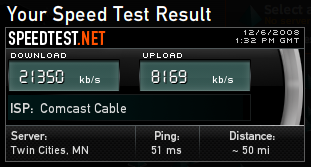
After power cycling my modem to insure everything was updated I pulled over 20 Mbps download. The upload is what really impressed me though. I’ve never seen an 8 Mbps upload or even anything close to it before. I did two more tests just to see and pulled 20,679/7,440 and 20,929/6,728. I didn’t do these as sterile tests, for all I know another computer may have been pulling stuff off the net as I did them. The numbers are impressive either way.
Nicely done Comcast. It’s rare that I would send them a compliment, but this is a welcome upgrade.
If you want to test your connection head over to SpeedTest.net and try it out.
'Back to My Mac' Needs iTunes Sharing Support
I’m now working full-time on my Mac’s and I’ve been surprised by how useful the Back to My Mac feature has been. I had never really used it before, but it’s great to be able to be in a coffee shop and grab a file off of my Mac Pro at home, or even control its screen.
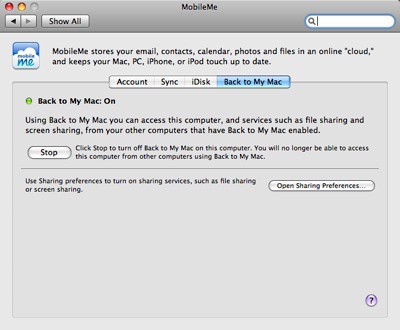
There is a feature though that would be so welcome in Back to My Mac. File Sharing and Screen Sharing is wonderful, but please add support for shared iTunes libraries. It would be so nice to be able to access any of the iTunes content from home wherever I am and it would seem pretty simple given what Back to My Mac is already doing.
Please?
My Nabaztag Rabbit just reported the stock market is “up up up!” It is so very wrong. Wishful thinking?
Trying to resolve a medical bill via several 800 numbers and IVR systems. Going nuts.
Having 200+ DVD’s ripped into iTunes + ubiquitous Apple TV is proving pretty cool. 1TB+ of content + Apple TV = Watching Return of the Jedi in the background just for fun.
Just finished reading Traffic. Really enjoyed it.
At the movies for Bolt with Maze. So fun that she digs movies.

Great Thanksgiving! Tomorrow resume 6am walk with the dogs and keep the fitness program on-track.
iDisk not having an iPhone App is just crazy silly.
This Amazon 50 albums for $5 is dangerous for the wallet.
Still not feeling 100% but went to spin class anyway. Glad I did.
Refill Products, Reduce Plastic Waste

Tammy drives a lot of our green decisions in the house. For a long time she’s been using all natural cleaning products. She doesn’t want the chemicals in typical cleaning products in the house, and we all benefit from it. Nearly all of our cleaning products are from Restore Products. I wasn’t even aware of one of the most impressive things that Restore Products does until a recent trip to Lakewinds, our co-op.
Walking down the aisle with household products Restore Products has put a refill station there. We took the three containers that we had of various cleaners and put them into the refill station. It spins the container and when it finds the bar code it knows what product this is and what size. It then lowers a filling tube into the container and you’ve got new product and no plastic waste.
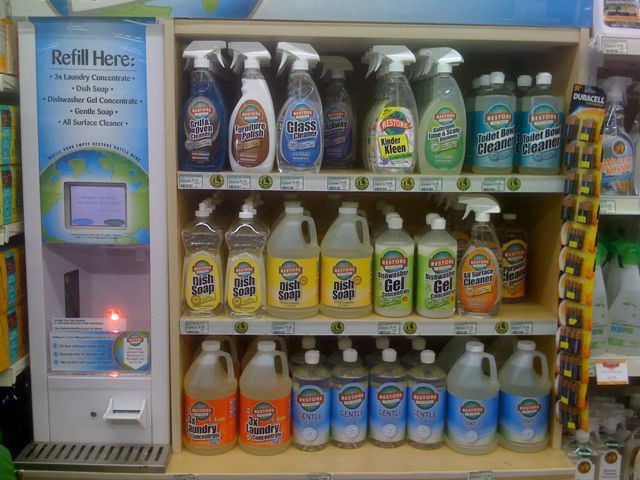
I love this. First, the system is fool proof using the bar code system. A side benefit of using the bar codes is that if you do insert your product and they don’t provide refills for it (happened with one of our bottles) they can collect that information and add it if there is enough demand. Mostly I just love that we can now get dozens, or hundreds, of uses out of the one plastic bottle. We’ve worked hard to minimize our plastic waste and this helps out greatly.
It’s great to see the co-op as more of a refilling station than a typical store. Bring your empty container for cleaning products, oatmeal, flower, sugar and just top them off from the various bins. Reduce waste and keep costs low.
Joining M4V Files is Painful
I’ve been processing my entire DVD library in the background on my Mac Pro using Handbrake, moving all the content into iTunes so that it is accessible from the three Apple TV’s that are connected to each TV in the house. I’ve now hit a some of the videos that are on two discs due to length, and joining M4V files is a bigger pain that it really should be.
One of the easiest ways to do it is with QuickTime Pro, and since I’ve got the Pro version I figured I’d use that. A simple copy/paste of one video to the end of the other followed by an Export to Apple TV creates the combined M4V file. With one big problem.

Huh? 205 hours and 44 minutes? Did someone forget to hit the “turbo” button in QuickTime Pro? What’s really crazy is the two source files are M4V H264 files already! Recoding is not necessary, but it seems determined to recode anyway. I guess I’ll just see what happens, but I’m worried the joined file will be poor quality due to recoding.
Any better options?