Encoding HD video in iMovie on my MacBook Pro results in a REALLY hot lap. 72 °C right now.
It’s really cool that the Flip Mino HD plugs right into your computer. But I’m always nervous it’s going to get broken while connected.
Mazie playing with shoes!

Mazie out on her bike. She’s doing great on her Skoot!

“I wanna watch a TV show!” — Mazie
Just ordered a Goldtouch Split Ergonomic Keyboard for my Mac. Wrist pain has returned. Too much laptop.
Conversation with Mazie…
Flight Control for the iPhone is still fun. And addictive!

Mentioned my Twitter info at the end of a talk I gave today. Looks like some picked up my Tweets. :-)
Amazon Elastic MapReduce looks interesting. Opens up some new solution paths!
Friendly Social URLs Using Redirects
Have you ever thought it would be nice to be able to easily give someone the URL to your Facebook profile? It’s not easy with the id number URL that Facebook uses. Just try saying “go to facebook dot com slash profile dot php question mark id equals six hundred and five million seven hundred seventy six thousand fifty seven”. Bzzzt, nope. Even something as easy as a custom URL for LinkedIn can be hard to remember. It hit me the other day that there is a really easy solution to this!
If you have your own domain name, and host the DNS somewhere, you are almost guaranteed to be able to easily create URL redirects. I use Namecheap and it is very easy to do. I created these URL redirects to make it a lot easier to tell people where to find me!
| Friendly | Destination |
|---|---|
| facebook.thingelstad.com | www.facebook.com/profile.p… |
| flickr.thingelstad.com | www.flickr.com/photos/jt… |
| linkedin.thingelstad.com | www.linkedin.com/in/jthing… |
| reader.thingelstad.com | www.google.com/reader/sh… |
| twitter.thingelstad.com | twitter.com/thingles |
It’s so much easier to say “Just go to flickr.thingelstad.com” to see my pictures on Flickr! Or “go to facebook.thingelstad.com”. Even Twitter allows people to just know my name, and not need to remember my Twitter username, and just go to twitter.thingelstad.com!
Nice huh? I like it.
Installers are evil. I have no idea what voodoo they do, and I’m sure there is voodoo. Everything should be drag & drop install.
I thought I had IE8 installed but now Windows Update has insisted on uninstalling whatever I had, rebooting, and installing IE8. Sigh…
Just ordered a Kindle 2. It’s time.
Flight Control - Great iPhone Game
This last weekend I grabbed a copy of Flight Control for my iPhone. It looked like the kind of game that I can get into. I like puzzle style games and have an affinity to 2D-gaming over 3D-gaming. I was pretty much immediately hooked.
The premise of Flight Control is simple. You have a top-down perspective of a landing field and you have to draw flight paths with your finger for each plane to land. There are different types of planes that fly at different speeds. Over time, the planes come faster and faster.

The game is addictive. I’ve now got a high score of 57 but am stumped how you get much past that.
Rule #78 for Bloggers: Never post about not posting for oh so long.
I am now a Thawte Web of Trust Notary. Cool!
Tracking Twitter Followers with Cacti
Two weeks ago I was one of the guests on Midmorning on Minnesota Public Radio for a show about Twitter. The result has been a lot of conversations lately about Twitter. I was intrigued to see how many people had started following me from the show and before you knew it I felt the absolute need to see Twitter follower graphs in my favorite graphing tool, Cacti. I did a quick search and was surprised to not find anyone doing this already.
As with anything Cacti-related there was a lot of trial and error to getting this working, and I’m positive smarter people than I can do this with much more elegance, but I got it working good enough for me and the output is pretty slick.
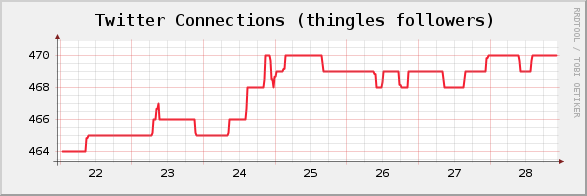
If you’d like to join me in graph-tastic, RRDtool, Twitter navel gazing here is how. And I do know there are services that do these graphs, but I don’t believe any of them do anything more than daily counts. This samples every 5 minutes.
I figured I’d do this in Ruby just to make the Perl lovers in the crowd uncomfortable. At first I tried to use the Twitter4R gem to get to the Twitter API but that had issues, mainly it couldn’t deal with paging in the Twitter API and thus just returned 100 followers. Instead, I went straight to the Twitter API and found a better call in the social graph functions that just returns the id’s of people you follow or follow you. Less data, lighter, and no paging! Yeah! Here is the incredibly simple code that we’ll use to get Cacti the data it wants. All the comments will make this easy to follow. 😊
require 'rubygems'
require 'open-uri'
require 'json'

def get_count(url)
    buffer = open(url, "UserAgent" => "Ruby-Wget").read
    result = JSON.parse(buffer)
    return result.length
end

def get_follower_count(user)
    url = '[twitter.com/followers...](http://twitter.com/followers/ids/') + user + '.json'
    return get_count(url)
end

def get_friend_count(user)
    url = '[twitter.com/friends/i...](http://twitter.com/friends/ids/') + user + '.json'
    return get_count(url)
end

followers = get_follower_count(ARGV[0])
friends = get_friend_count(ARGV[0])

puts "followers:#{followers} friends:#{friends}"
Note that all this does is output one line that looks like this:
followers:464 friends:117
Cacti uses a simple name:value format to parse output from shell scripts. This little bit of Ruby does have some Gem dependencies, mainly a JSON library to parse the mess we get back from the API calls into something that Ruby likes.
This script takes the username as a command line parameter. This is so you can multiple twitter accounts in Cacti. Not only can you gaze at your own navel, but you can gaze at your friends navels too!
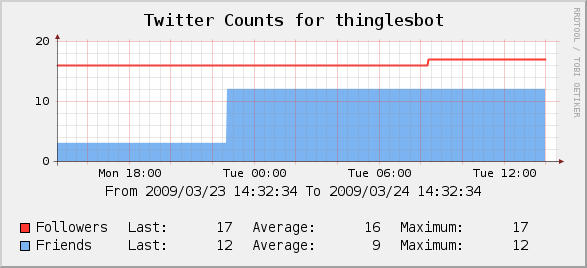
Let’s get to the point and show what the win is for this before we go through the Cacti configuration stuff. Here is the simple graph that we can use to track follower and friend counts over time.
I didn’t create Cacti templates for any of this, if you want to set it up yourself here are screen shots of the setup.
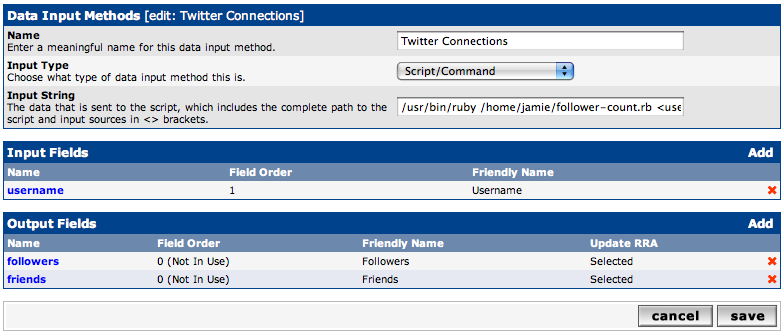
After you have put the follower-count.rb script somewhere and verified that it works from the command line you need to make a data input method in Cacti to get the data. Here is what that looks like (click on the image to enlarge). This is where you will pass in the Twitter username. If you want to track more than one Twitter account you just create another Data Input Method and pass a different username.
If you tried to track dozens or hundreds of users using this method I expect you will start hitting Twitter API request/hour limits. I currently track three accounts, which is 36 requests an hour. I haven’t hit any problems with that, but I would expect that if you were trying to track 100 accounts, and thus requesting 1,200 API calls, you would be denied.
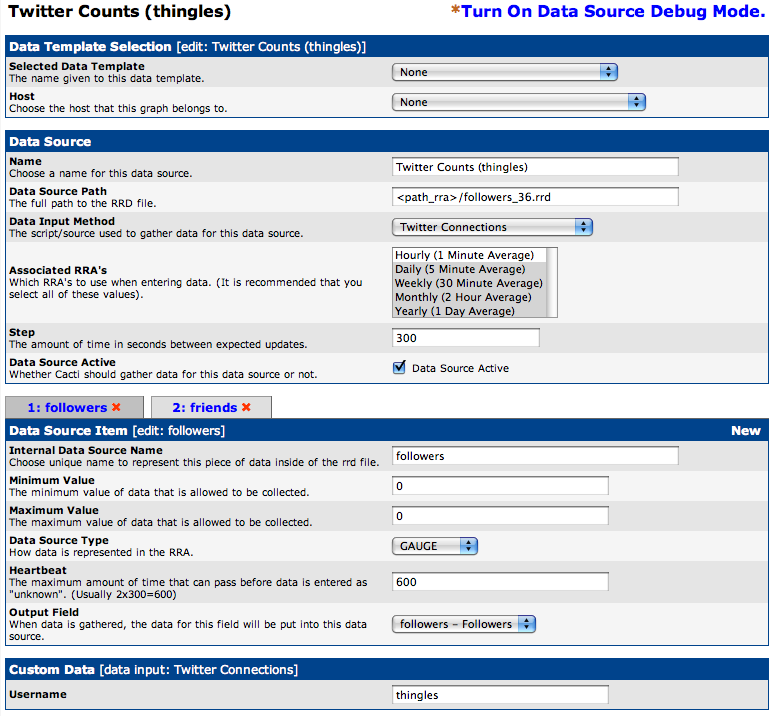
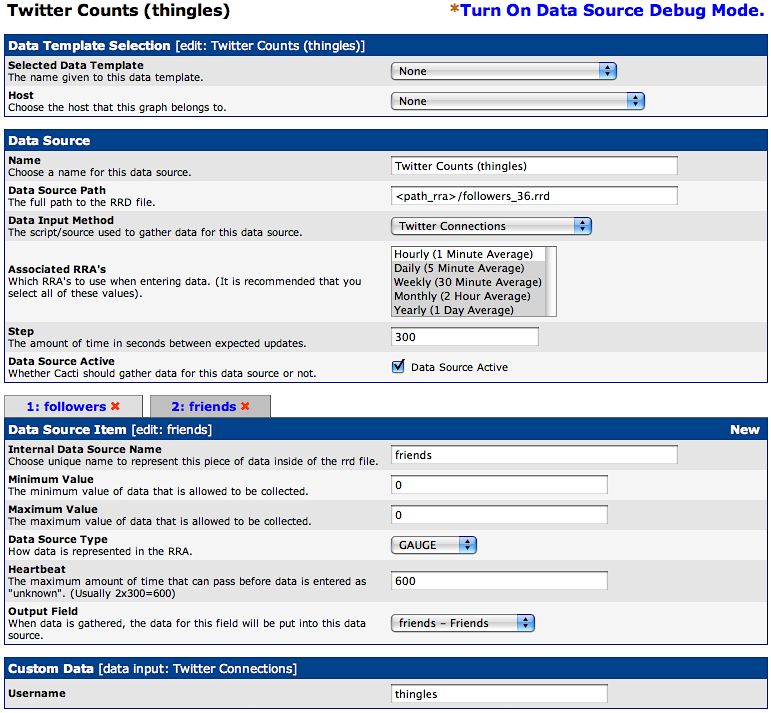
After you define the Data Input Method we need to create a Data Source. This one is the most tricky to get right. You need to make sure that you have the right RRA’s selected and it is very important to get both of the Data Source Items defined and mapped to the right Internal Data Source Name. Just make the screens look like this and it will be fine. It is very important that you do not have a Maximum Value defined. By default, Cacti will sometimes put 100 in there and cause the scripts return value to be ignored!
Remember that you will need to let a couple of poller intervals pass before the data is available for graphs to work. If you make the graphs right away expect some errors until data is available.
Here is the 2nd Data Source Item defined.
After all this we need to make the graph itself. Here is where it would be really nice for everyone else if I defined a graph template. However, I have no clue how to make a graph template so you’ll have to do it like I did, by hand. You can do this however you like, here is the most typical setup I use with 8 Graph Items.
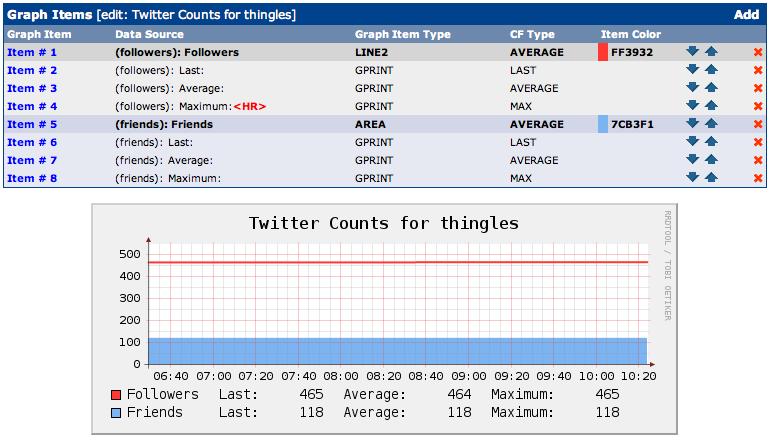
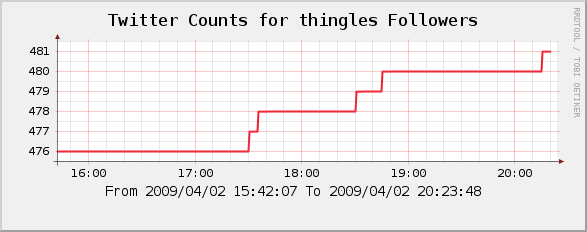
If your count of friends or followers is very high, and dissimilar, you may find it helpful to graph followers and friends on different graphs so you can see changes easier. This is what the first graph in this post shows that you cannot see if you put that same line on a graph with a bigger range for a Y-scale.
Twouble with Twitters
Current just posted a video mocking the “twittersphere”. Well done, and pretty funny too. :-)
Of course I saw this via mkortekaas on Twitter. Hmmm…
View-Master
I was flipping through the March 14th copy of The Economist and ran across “The final reel” story. Fisher-Price is no longer going to make the View-Master. It was an odd article. I felt rather sad. I think because I distinctly remember as a little boy looking through my own View-Master and being amazed at the images and also completely obsessed trying to figure out how it worked. The experience continued this summer as Mazie enjoyed looking at her very own View-Master.
Going forward kids will only be able to get reels of animated characters and other licensed, copyrighted characters for the View-Master.