“Domain names, like ideas, are cheap.” — me
CAPS LOCK DAY
CAPITAL LETTERS REALLY DON’T GET THE RESPECT THEY DESERVE. MAYBE WE NEED TO HAVE A CAPS LOCK DAY WHERE WE DO EVERYTHING IN CAPITAL LETTERS. IT WOULD DRIVE ME INSANE, BUT WHAT THE HECK. CAPS LOCK DAY ANYONE?
Ridiculous Grill.

Deck Resurfaced
Sometimes I get really excited by projects we have done around the house (garage shelves, rain gutters. Right now I’m really excited about the new decking boards that we had put on our deck. Our deck surface was original with the house, now 20 years old. The boards were rotting out in places and the nails constantly were coming loose. This weekend Terry Owens, the awesome owner of Como Lake Carpentry, pulled off all the old wood and replaced it with brand new cedar.

Now we’ve got great new wood with a wonderful neutral stain. Here are some more shots of the new deck.





We have been in Lignite, ND this weekend visiting my family. It’s really nice to see everyone. In addition to great relatives, I’ve had less stellar visits with a couple of Windows XP machines that needed various levels of help. Mostly cleaning up junk and updating things, however, my aunt had a full blown spyware infestation that was fairly gnarly. Microsoft owes me about 5 hours of time from this trip.
Just ordered my tickets for Surly Fest!

How to Expire Tweets on Twitter
A lot of people consider Twitter a microblogging platform. I don’t really agree with that. I think Tumblr and Posterous are great examples of microblogging platforms. Twitter, to me, is much more like a “micromessaging"platform. As such I think it has more in common with email and instant messenger than WordPress and Tumblr.
I’ve been thinking more recently about the digital trails we all leave and it struck me that Twitter really should be managed more like messaging applications. In those applications, I tend to have an expiration date for things. To be formal about it, there is a retention policy for that content. Twitter needs a retention policy. Do I really care to have archived forever the Tweet about lunch from three years ago? No. Does Google need to index it? No. The only practical use I can think of for a long history on Twitter is to be able to profile me for advertising better. No thanks.
I did a little looking and couldn’t find anything to do this, so whipped up a Ruby program with the handy Twitter4R library to do what I want.
This script requires Ruby, the Twitter4R library and is intended to be ran on a schedule with a utility like cron. Edit the code to use your login credentials and set the days that you want to expire tweets after. This program will then repeatedly look at your timeline and delete status messages that occur more than the number of days you specify ago.
#!/usr/bin/ruby
#
# Get requires out of the way
require('rubygems')
gem('twitter4r')
require('twitter')
require('time')

# Configuration parameters
twitter_username = "YOUR_USERNAME"
twitter_password = "YOUR_PASSWORD"
delete_after_days = 14

# Let's get a Twitter Client created
client = Twitter::Client.new(:login => twitter_username, :password => twitter_password)

# Expire deadline
expire_before = Time.now - (delete_after_days * 60 * 60 * 24)
expire_ids = []

puts "Expiring all Twitter updates prior to #{expire_before.to_s}."

# Iterate through timeline
# Purposefully get a large number of updates. As written, if your delete_after_time does not
# occur within the number of updates this script will never see an update that is old
# enough and never delete anything. It would be nice if we could request the timeline from
# the oldest tweet forward, but I cannot find a way to do that with Twitter4R. (The :since
# parameter does not seem to do anything for a :me request)
# If you have problems with this scripte set the count to something like the number
# of tweets you would create in delete_after_time days.
# Using the defaults, if you Tweet more than 200 times in 14 days this will never expire
# anything. If you try to use an expire length that is very long, like 365, this many not
# work at all.
timeline = client.timeline_for(:me, :count => 200) do |status|
  if status.created_at < expire_before
    puts "Queueing delete status ID #{status.id} created at #{status.created_at}  (#{status.text})."
    expire_ids.push(status.id)
  end
end

# Now we'll sort the array, this will have the affect of putting the oldest items first in
# the list to be deleted.
expire_ids.sort!

puts "Deleting #{expire_ids.length} tweets."

# Now let's delete the stuff
# The Twitter4R library delete method seems to be completely broken. So, rather than a simple
# client.status(:delete, delete_status) we are going to go right to the API methods on Twitter
# this is ugly, but we are just going to spawn curl to do this work for us. And I'm sure I
# could do this without execing curl in the shell, but, whatever...
# Note: the delete method is not rate limited.
expire_ids.each do |delete_status|
  puts "Deleting #{delete_status}..."
  `curl -s -u #{twitter_username}:#{twitter_password} --http-request DELETE [twitter.com/statuses/...](http://twitter.com/statuses/destroy/#){delete_status}.xml`
end
This script does not do any checks to make sure the delete commands succeeded. Consider yourself warned. I don’t think it matters much since if it fails a delete it will just try again the next time.
Since the delete method is not rate limited, you could run this whenever. However, I would suggest to run it at once a night, perhaps late in the evening, so that you don’t interfere with the Twitter API usage from your normal Twitter clients.
Apple Store preparing for Snow Leopard release.

TED Video: Hans Rosling Dataset Mindset
The visuals in this talk by Hans Rosling at TED blew me away. Animated displays of 200 years of economic data about the world.
Mazie Photo Shoot
Last Friday Mazie and I had a super fun “Daddy-Daughter” day filled with many fun things. Part of our fun day was a trip to a store to get a new dress (we ended up getting two) followed by a photo shoot in her new clothes. We decided to do the photo shoot in our front yard, taking advantage of all the wonderful tall grasses and native plants. Mazie had a ton of fun, and so did I behind the camera.













Goodbye Blue Dog Mural
This week we said goodbye to one of the most distinctive art features of our house. In January of 2003 Tammy’s longtime friend Liane McMeen painted a great mural in our living room that surrounded a piece of art that we got in Denver featuring a dog positioned in a Volkswagen Bug door. For over 6 years when people have come into our house and turned the corner to enter the main living area, they’ve been greeted by a very large mural that put a smile on their face and welcomed them to our house. It set the tone of our house: fun, lighthearted, happy.
As much as we liked the mural, we decided that it was time for a change, and that the mural should be retired. We celebrated with a dinner at our house with Liane and her husband Chris. Just this week the actual paint went up and the mural is gone. Some wonderful new pieces of art have gone up in the spot.
In memory of this great gift, I decided to do a new version of the original time-lapse video I did when the mural was put up, with some new photos on the end.
I put in the post 6 years ago that “We live with all of our art, but this is part of every day.” That couldn’t be more true. Thanks again to Liane! We still have the Blue Dog sculpture but it has been moved to a different spot in the house.
Frankhouse
Enjoyed listening to Frankhouse tonight at the 318 Club. Good jazz. Friend of mine is the lead/trumpet player.
Still totally digging my Mini.

Just finished an emergency dog bath for Chase. I have no idea what he got into, but it smelled absolutely horrible. Hopefully a double shampoo got whatever off of him. Ugh.
Holy crap did the WordPress plugin Hot Linked Image Cacher just save me a ton of effort in moving things off of Tumblr.
Surly Hell
I got an email from Four Firkins at 10:13 am that they had received their very first limited shipment of Surly Hell. They were limiting sales to 2 4-packs per customer, and opening 2 hours earlier to accomodate. I immediately mobilized with my neighbor Mike and off we went. Got the last four 4-packs in the cooler. They sent an email at 11:47 am saying:
Sorry people, it was crazy in here, it’s all gone.
It tastes delicious.

iPhone Pro Tip: Launch Apps with Spotlight
With the 3.0 release of the iPhone software Apple brought the platform level search capabilities of Spotlight to the iPhone. This has been a really nice addition, one that I’ve been using very regularly.
I’m a bit of an “app-aholic”. I’ve got more than a handful of applications installed and as a result I often have to flip through pages of apps in Springboard to find the right application. Sometimes I have a hard time finding the icon I’m looking for. I was thinking how I really wished that the iPhone had something like Quicksilver, and then it dawned on me that Quicksilver was really made as an optimization of using Spotlight as a launcher. Well, the iPhone has Spotlight so this should work, right?
With many applications installed I may have to swipe as many as 6 times to get to the application I want to launch.

But if I just do a single swipe, or a double-tap of the home button with the right settings, I can be at Spotlight and just start typing the name of the application I want. Say I wanted to launch a Twitter client like this.
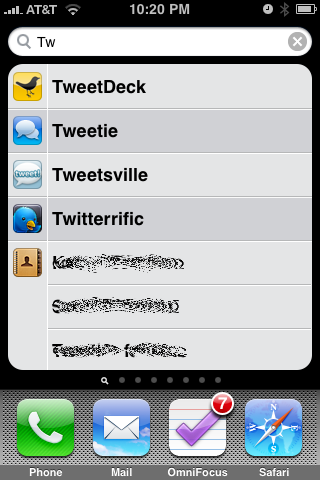
One action to get to Spotlight, type two letters, and launch. Pretty much as good as using Quicksilver on my Mac. A lot faster than all that swiping, and it saves on thumb fatigue.
Now, it won’t work like this out of the box because by default Spotlight wants to show you email messages, address book contacts, and pretty much anything else before it will show you an app. So, let’s change that.
How to Set This Up
First, launch Settings and tap on General.
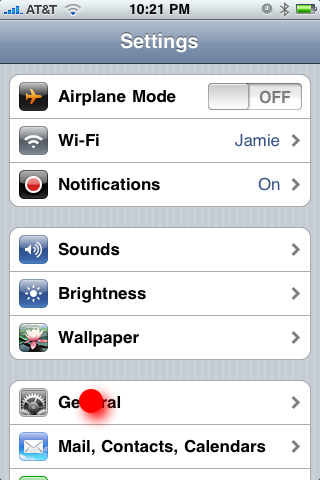
Now tap on Home.
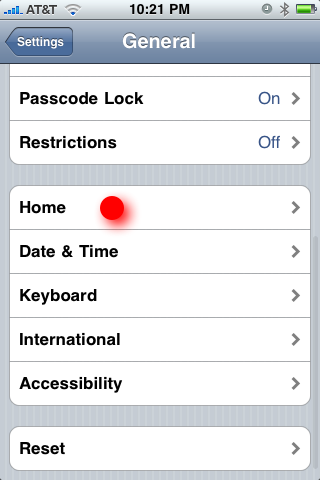
We are now going to change search preferences. While you are on this screen you may also want to specify that double-tap of Home button launches search. With that, you are just two taps away from launching a new app anytime.
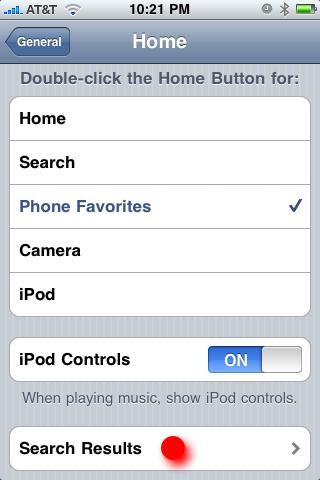
Okay, now we are just going to reorder the search results and put the Applications at the top of the list.
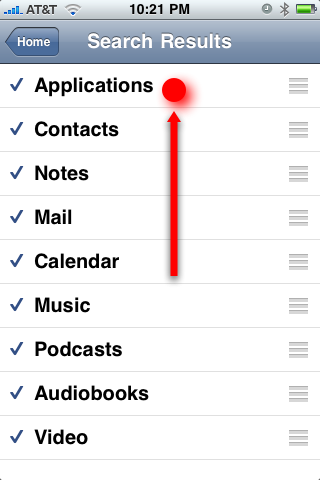
That’s it. Done. You can now simply double-tap the home button and type a letter or two to launch any of the dozens and dozens of apps on your iPhone. Nice!
Why don't RSS Readers support kill files?
As I was flowing through my RSS subscriptions in Google Reader I was struck for the millionth time how much everyone likes to write about “All Things Twitter”. “Man, I wish I could just zap these items from these feeds” I thought. Then it hit me that I used to do that all the time in my favorite Usenet News Reader nn nearly 20 years ago! Usenet programs nearly all supported killfiles, and it was great.
What is a kill file? From Wikipedia:
A kill file (also killfile, bozo bin or twit list) is a per-user file used by some Usenet reading programs (originally Larry Wall’s rn) to discard summarily (without presenting for reading) articles matching some particularly uninteresting (or unwanted) patterns of subject, author, or other header lines.
That is exactly what we need in our RSS readers. Please, please, pretty please?
Water Lily
We were having a nice afternoon at Como Park today and the Water Lily area was just breathtaking. Sometimes the subject is so amazing that you just need to point the camera and shoot. Minus a slight crop, this is straight off the Canon 5D Mark II sensor through the 70-200mm f/2.8L.