
Family
Heartfelt updates about family milestones and everyday moments. From taking Mazie to college and annual visits to the Renaissance Festival to Swedish‑pancake breakfasts and VR outings with the kids, this category celebrates togetherness.
- Shows that we season pass and watch on our schedule.
- Political coverage, breaking news and occasional sporting events – these are all watched in realtime.
- European sports coverage: professional cycling and Formula 1.
- Rarely we might watch a movie via pay-per-view.
-
The quality of the picture is amazing. DirecTV takes the 1080i signal from the broadcaster and re-encodes it typically at a lower bitrate and then sends it over the satellite. The picture quality is noticeably better using a direct OTA ATSC tuner.
-
Simpler and easier to use since you are watching TV just like watching TV. You aren’t controlling a DVR through an IR repeater that actually lives in the lower level. When people babysit Mazie and want to watch TV it’s always so complicated. Not so in this model.
Mazie skiing for the first time ever. She did really awesome. Ruled the bunny hill. She went down it probably 20 times.

I like 1 minute cause it’s just like an hour. — Mazie


Mazie has always had her Lions since she was a little baby. Yesterday our neighbors gave her this great Lion sweater. She’s loving it!

Mazie getting ready for brunch at Butter.

iTunes Tip: Using a "No Playlist" Playlist

I have all of my music in iTunes and it is my central hub for distributing nearly all content to various iPods, iPhones and Apple TV’s throughout the house and on-the-go. In my iTunes library, as of right now, I have 18,439 items totaling over 65 days of continuous music without any repeats. The only way to get the most out of a really large music collection is to leverage Smart Playlists extensively, and I do.
I have dozens of Smart Playlists to listen to all kinds of slices of my music archive. Creating these Smart Playlists involves setting the criteria of what I want in the playlist, but also, what I don’t want in the playlist. For example, unless the playlist is for Mazie’s enjoyment, I don’t want any Children’s Music in it. Similarly, unless the playlist is for the holidays, I don’t want Christmas music popping up. Sure, it’s a 5-star Christmas song, but that doesn’t mean I want to hear it in my 5-star Smart Playlist in July.
So, I started by having a lot of repeated rules in my Smart Playlists and having to update dozens of things anytime some of my criteria changed. After dealing with that, I figured out a way to be a lot smarter about my Smart Playlists. Use a Smart Playlist to remove the stuff you don’t want in other Smart Playlists.
“No Playlist” Playlist
To do this you first need to create your No Playlist Playlist. This could be called a “blacklist” of songs, but that seems more like unchecking songs. This is more a greylist of songs you only want to hear when you are specifically looking to hear them, regardless of their other qualities. Just create a Smart Playlist and make sure to change the match criteria to “any” or you will likely not have any matches. Also, it’s a good idea to uncheck the “Match only checked items” checkbox. If you don’t, and have other Smart Playlists that don’t check that, you will let some stuff through.
I have mine setup like this:
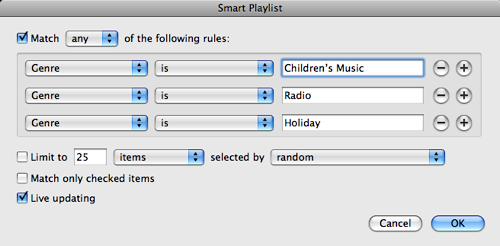
This creates my No Playlist Playlist with all Children’s Music, Radio content (archived episodes of This American Life mostly) and Holiday music. I’ve now got a good list. So, next I take my Smart Playlist of “Music from the ‘80’s”. Clearly I want all my great high school favorites, but I don’t want Mazie’s Red Grammer album showing up in there, or any other stuff from my No Playlist Playlist. So a simple rule as follows will keep it right (see the last criteria).
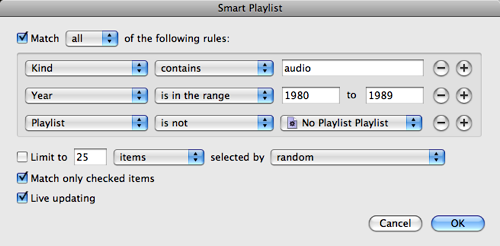
Now, the reason this is great is that I’ve now abstracted that rule into another set of conditions. So, if I forget one, like Comedy, that should be excluded from dozens of playlist I can simply change my No Playlist Playlist and it’s all better. I could even get funky with this and exclude tracks that were played within the last day or so, forcing rotation through other playlists without doing the work in each and every Smart Playlist.
Cool, huh?
Mazie Sings Santa Claus is Coming to Town
Mazie really got into Christmas this year. It made Christmas so much more fun for me this year just to see the excitement and enthusiasm she had for the big day. She started to sing along to some of the Christmas Music we had playing and were singing to ourselves and really got into Santa Claus is Coming to Town.
Shortly after Christmas she picked up her guitar and gave her own rendition. Cutest video ever. :-)
AirTunes Bug in Apple TV 2.3
I was doing some work on my Apple TV’s today, swapping out hard drives, and at the same time we’ve had some painting going on so my 802.11n network has been offline. I got done upgrading the Apple TV and plugged it into ethernet to do an initial sync. Afterwards I put it upstairs where it normally sits on an 802.11n wireless network, but today it’s not connected to anything. That was fine since I wanted to test playing local content.
Mazie wanted to watch a quick show so I fired that up and it worked great, no issues. I decided then to play some music and hit a wall. The Apple TV refused to play any music or audiobooks. At first I thought it was something with FairPlay, even though that made no sense, but I couldn’t even play MP3 files I had ripped off of my own CD’s. Something was amiss.
It hit me then that this Apple TV typically connects to the AirTunes destination for the Living Room, and that with no network connection it wouldn’t be able to see that. Bug! I tested it out and verified that this is indeed a bug in Apple TV 2.3.

If you have your Apple TV set to play through an AirTunes destination, and you then take the Apple TV off of all networks, it will fail on playback of content that it would typically send to AirTunes (video will work fine since that never goes to AirTunes). Now, what really kills about this bug is that since there is no network the menus have no options to deselect an AirTunes destination. It seemed the only way to get rid of this issue would have been to do a reset, or get it back on a network and deselect the remote speaker destination. Ugly.
I chose to just get it online and deselect the speaker set. Resetting settings would cause me to have to change other things as well. I filed a bug report with Apple, #6484963. Hopefully they will clean this up. It’s not a likely scenario, but I could see it happening particularly if you took an Apple TV to a cabin for the weekend and then wanted to listen to music without a network connection.
“Somebody’s hands are sticking out!” Mazie’s reaction to some interesting art.

2:57 pm: Leaving Olson’s and driving to Bismarck today. North Dakota bound!
11:30 pm: Longest drive to Bismarck - EVER. In hotel. Mazie asleep. Chase is very anxious.
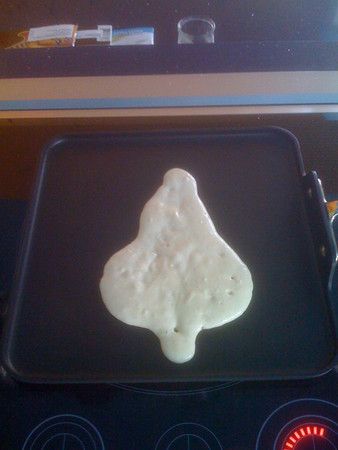
Christmas Tree pancake for Mazie this morning!
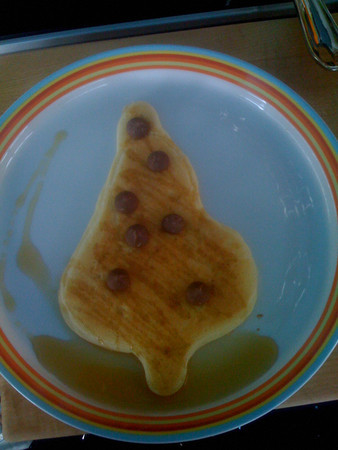
Finished pancake with chocolate chip ornaments and maple syrup garland.
Total meltdown from Mazie staying up an hour after bedtime. Complete FAIL.

I know they are man’s best friend and all, but sometimes there is just no way around it, dogs suck. Lately this has been applying to Chase more than Izzy. For the last few months he’s been really into eating, well, anything. Mazie’s toys. Books. Stuff we cannot identify after he’s mauled it. The newest one that just amazes us is the dimmer light switch knobs. That’s right. He pulls the knob off the wall and eats it.
Yesterday, after being out of the house for a very short lunch, I was welcomed with this scene at the front door.

Ugh! It’s every bit as bad as it looks. What did he eat? Well, it’s the back of one of Mazie’s cool Jennifer Delong Modern Ultrasuede Chairs.
He had grabbed the seat back cushion and went to town. The most amazing thing about it is that the zipper was opened, and not damaged. It’s like he gently opened it up and removed the foam to have a big foam party with. Unfortunately he did chew a hole in one of the corners so we are hoping the seat back can be replaced.
I really hope he grows out of this chewing festival soon. We’ve got dozens of toys around for him to eat, but those generally are spared.
Mazie had Belgian waffles for the first time this morning. She’s a fan! The “big” waffles hold more syrup, FTW!
Dad: “The balloon popped, it’s broken, you can’t have it.”
Mazie: “Daddy, I want the balloon.”
Repeat x100.
DirecTV v. iTunes & Apple TV
I recently was doing a review of some of our monthly expenses. With the economy in the toilet I think this is a pretty common activity. Mainly I wanted to look for things that we weren’t necessarily using, or didn’t think we needed anymore. The trick to doing this exercise is to annualize all the expenses. $50 a month doesn’t sound nearly as expensive as $600 a year.
Mostly everything was fine, but one number jumped out at me in a very big way – DirecTV satellite TV service.
$1,079.88
That is the annualized cost of our DirecTV service. When looking at that number Tammy and I didn’t feel like we got anywhere close to $1,000 of value out of the service. What to do?
What do you want?
To be clear, none of this is stuff that you really need but is instead something we want. So I started by looking at what we actually use the $1,000 of service for.
We are in essence only DVR users. We don’t really ever watch live TV, instead grabbing season passes for the shows that we have decided to watch and then skipping the commercials. This makes it really easy to explore options as our usage is pretty simple. Our TV usage could be broken down as follows:
That is really it. To be fair, that $1,000 buys more than just that, but I don’t care since I don’t use it. We use DVR extensively, but almost never to “pause live TV,” instead just to time-shift content. That is an important distinction for us as it removes a key need of DVR that some people have.
Solution: Season Pass Shows
We have three TV’s in the house, they are all Sharp LCD panels, and each one has an Apple TV on it connected to a central iTunes repository. iTunes now offers a decent variety of content so I took the shows that we had season passes for and did a comparison on iTunes. We season pass a total of 13 shows and all but 2 of them were available. The two that were not were both HGTV shows and they have very little on iTunes, and the content was really optional for us.
I then added up the season pass cost for iTunes for each of these shows, calculating it at the cost for the high definition versions of the show (interesting note, you could save even more money by opting out of HD for some shows that you may not care about the quality difference for). The total was:
$647.76
Wow! For our first need I could replace everything that we get now with the same content from iTunes and in the process I can save $432.12. Not only do I save over $400 a year, but I don’t even have to skip commercials since there are none to skip. And there is more. Once the content is in iTunes I can now time shift it like we always do, but I can easily place shift it with my iPhone or iPod. Lastly, I get a better service because the way our house is wired up now I only get HD content downstairs, and with this solution I get HD content for all of these shows.
The story doesn’t end there though. I found that this analysis totally changed the way I was looking at these shows. With DirecTV I have to pay that $1,000 to get into the buffet and then it’s all you can eat from there. Moving to an iTunes solution I was making the decisions independent of a service package or even the network it was on. I found some interesting variances. For example, one of the shows we watch occasionally is Heroes. But Heroes costs $64.99 for the season. I compared that to a show we really like to watch, Boston Legal at $24.99. I would be happy to pay even more for Boston Legal, but there is no way I would pay over $30 for a season of Heroes. Heroes gets cut out. By doing this, the cost of our programming drops another $150-$200 dollars further.
The other big change is how a show like The Daily Show weighs in. You don’t buy a season of The Daily Show, you buy a pack of episodes. The impact of this is that if you stop watching for a month you pay nothing. If they go to reruns for a week you pay nothing. So how do you calculate the cost? I just assumed the worst case of every episode, with all episodes being new every day, all year. If that happened (which it never would), it would cost $119.88 a year for the Daily Show.
On first blush that seems really high, but when I thought about it the real costs would likely be around $80 since there are many rerun periods, and we tend to watch for a while and then not watch for a while. Even then that seems high, but, if I considered what content we watch with what frequency you can justify that it should be the most expensive thing we subscribe to given its daily frequency.
Anyway, my expectation of the real world cost of getting this programming is that it would come in somewhere around
$420.00
That’s right, we would cut our cost by 50%.
Solution: Live Programming
So the next thing I needed to figure out is live programming. This is mostly an occasional football game or election coverage every couple of years. For us this programming is almost all on a major broadcast network, and they all send out wonderful HD broadcasts that I pick up with my ChannelMaster 4221 antenna. I already have that coming into the house on coax and going to the DirecTV satellite tuner.
It turns out that it is very easy for me to get this everywhere in the house. I can just reuse the coax that is already going to each TV and hook the antennae up to it and then plug it into the ATSC tuners on all the TV’s.
This solution actually proves to be superior than our current solution in a few ways:
Now, I don’t have any way to get CNN live for breaking news of that nature, but that is why I have a broadband connection and computers all over the house.
Solution: Cycling and Formula 1
This one is the hard one. There is no solution. Nothing. I’m willing to forego Formula 1 in its entirety, but I really want to watch the grand tours. My best option would be to subscribe to a web site and watch it over the web. You can do that, and in many ways the coverage is better and more thorough. Versus (formerly OLN) continues to have weaker coverage, although I expect with Lance racing again this year it will be better.
Solution: Pay-per-view
This is a simple swap. Instead of pay-per-view bound to time we can just rent on-demand via the Apple TV. The experience is way better than anything pay-per-view offered.
Next Steps
I’m currently battling with DirecTV to move forward with this. I’ve been a customer for about 12 years and they are trying to make the case that I just renewed my contract due to their requirement to swap in MPEG4 receivers for me and take my TiVo (MPEG2 only) boxes away.
It is very clear to me that I will save money and have a better service. I’ll save a lot of money in fact, and have a way better service. I also like that it will get rid of the occasional channel surfing that could be better spent reading a book. But with that said I’ve also felt some hesitation to pull the cord on this. I likely just need to do it and not look back, we’ll see. Saving $600 a year sounds great!
But what about DRM?
You can’t look at this option without addressing DRM. I have a couple of different thoughts on this.
First, DirecTV and its satellite based DVR system is a DRM world that is even more locked up than iTunes and Fairplay. At least with Fairplay I can use it anywhere in the iTunes ecosystem. The DirecTV environment I can’t even get something from one DVR to another, much less to my phone or media player. So, here I’m saying we already have DRM and iTunes is a “more open” DRM.
Second, this is TV content and after I’ve watched it I may not even keep it around. With DirecTV I watch an episode and delete. With the iTunes solution I own (with DRM) the content and can keep it forever (as long as Fairplay works). But I don’t really care about keeping it forever. It’s not a movie or music that I own, it’s a show I watch and then move on.
Lastly, I do think that DRM is going to fade away at some point, and when it does I would only want to be on a DRM system that the majority of “the herd” is on. I find it hard to believe that Fairplay could ever stop working. Even if Apple went out of business and died a horrid death, Fairplay would have to be addressed. There is simply too much content (#1 music reseller is iTunes?) for it to not exist, or be purchased away and made free the same way that iTunes Plus works now. So, there is a clear technical path to phase it out that could be put into effect pretty quickly.
Bunny pancakes this morning for Mazie!

Bear pancake for Mazie this morning.

iBrow
Lately Mazie has really been into letters and trying to figure out what letter a word starts with. For example, she’s figured out that “Mazie starts with an M”, “Apple starts with an A”, etc.
Today she declared that “eyebrow starts with an I”. Tammy explained to her that while eyebrow does sound like an i, it is really an e, and that sometimes words are a little tricky. I suggested that if Apple were to describe eyebrows they may in fact start with an i.
iBrow
At Madagascar with Mazie. She is “excited”.