
Saying goodbye to nearly 5 months off. What a great, great summer it has been. Feeling very fortunate.
iWork really badly needs a Numbers.app 2.0. It’s a nice try, but needs a big boost.
Indian-style Potatoe-Spinach soup with Chicken. Yum!
MacBook Pro Battery on the Ropes

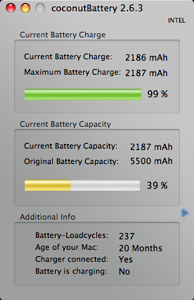
I’ve been thinking that my MacBook Pro’s battery has been especially lightweight lately. To be honest, none of Apple’s laptops do great with battery life but it’s been an especially poor contender lately. I fired up CoconutBattery to check out the state of affairs and it was shocking. I’m currently only getting 39% of original battery capacity. The battery is only sucking up a measly 2,187 mAh out of a rated 5,500 mAh.
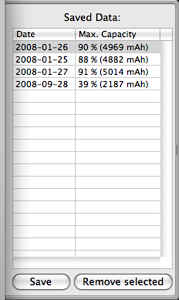
I’m going to try a series of battery conditioning cycles and see if I can get this thing back. In January I was right around 90% of capacity and the battery has only gone through 237 cycles in its 20 month lifespan.
Time to do a cycle on my battery. Only 51% of capacity available!
At a movie with Tammy and totally excited. Seeing Burn After Reading. First movie out in months! Thanks grandma for watching Mazie!
Fun day at Minnetonka Orchards with family.
Running DVDFab inside of a Parallels VM working on a DVD. Seems to be working.
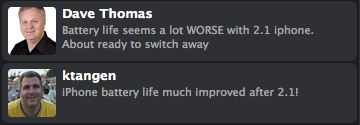
Which is it?
This was from a couple of weeks ago when iPhone OS 2.1 came out. It’s so common on the web to research a product and find completely contradictory opinions. One person will say it’s horrible, doesn’t even work. Another says it’s amazing. Rarely do you see those differences right next to each other in Twitter though.
Too Much Trash
This is a sign of bad housekeeping on your computer. Exactly what were in those 74,959 files anyway? Hmmm…