
I’m carrying my camera today instead of laptop. My camera turns out to be much heavier. :-)
- Picking up two whole beef tenderloins for tonights grilling extravaganza! I (heart) Clancey’s.
- I really need to learn to call my meat order ahead to Clancey’s. Let them prep ahead of time.
- Getting whole beef tenderloin at the butcher is like having your birthday at Applebees - everyone claps and congrats abound.
- Getting whole beef tenderloin at the butcher is like buying a MacBook at the Apple Store. “Congratulations!” and big smiles.
- Man, there goes more arm hair courtesy of the Big Green Egg.
- I’m experimenting with the tenderloins tonight. Hopefully I won’t regret it. 😕
- Tenderloins were great. Consensus around the table is the coffee beat the pepper crusted.
In celebration of getting U2 tickets for next summer, I’m sharing this from McSweeney’s.
Just scored 2 tickets to the U2 concert in June!
Had a surprisingly pleasant interaction with two different health insurance companies.
John Muir’s birthday should be a national holiday. I’m declaring today John Muir day. What an amazing person. Read up on John Muir on Wikipedia.
- At the Mpls Photo Coop for Final Cut Studio Workshop. Great space! My first time here. Won’t be the last!
- Suffering through an Aperture demo (I’m a Lightroom guy) before getting the Final Cut Pro stuff I came for.
- I’m totally biased, but Aperture looks really amateur compared to Lightroom.
- Yeah! Final Cut session started!
- Alpha Transitions are sweet in Final Cut Pro! Wish it didn’t cost $1,000. 🙁
Enjoying some quiet time at Toraccino with a Macchiato before heading to Mpls Photo Center for seminar tonight.
At the Minnesota Public Radio Future of News event today, getting started.
Running my MacBook Pro in target disk mode to attempt to recover a broken Parallels VM. Very slick!
Twitter’s new Retweet mechanism needs a global setting to turn of ALL retweets, in addition to the per user capability.
Just finished a great home movie in iMovie. I know some people think iMovie blows, but I couldn’t disagree more. So nice, and so easy.
iTunes Smart Playlist: Three Plays
I’ve written before about some of the ways I use Smart Playlists in iTunes to enjoy my music more. I’ve got a large music collection with 1,463 albums containing 19,392 songs. I have a challenge keeping new music highlighted in this big pool of nearly twenty thousand songs. Today I had an idea for a Smart Playlist that I’m finding very useful.
I call the playlist Three Plays and the basic idea is that any new track added to my collection should get three plays before it gets shuffled into the general archive. The playlist works like this:
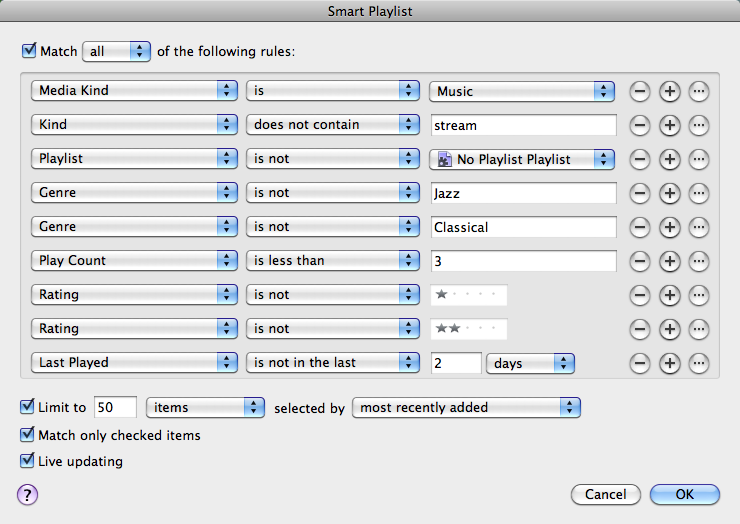
The criteria are pretty straight forward:
- The first five rules are all about restricting the content to just music. The “stream” rule makes sure that no Internet radio stations I’ve manually added in iTunes show up. I’m using my No Playlist Playlist here to pull a bunch of content out. I’m also excluding Jazz and Classical because I listen to them differently than other genres.
- The 6th rule is the critical one, show me tracks played less than 3 times, and combine that with a limitation to 50 items selected by most recently added. Show me new stuff that I’ve listened to less than three times.
- The rating rules help me kill a track if I just don’t like it. Give it a 1-star or 2-star rating and it goes out of rotation right away.
- The last rule is really slick to keep things fresh. Without it you would be listening to the same new stuff over and over until you listen three times. Not good. This spreads the listens out over time.
I’m finding this really useful and a great playlist to just fire up when I sit down at the computer. Give it a whirl and see what you think!
I’m an avid Safari user, and when I launch Firefox I wonder if they are purposefully making it ugly. Can someone please clean it up?
With Apple and Google getting less cozy, how long until Safari allows easy switching away from Google for search bar?
What the… Bing is indexing one of my websites which has an explicit robots disallow. C’mon people!
Just got the new retweet features turned on in my account. Looking forward to being able to disable nearly all retweets! :-)
Upgrading my Vista license to Windows 7 is going to cost me $200? What the? Someone at Microsoft needs to look at Mac OS X pricing.
Ugly Bug in Mac OS X Address Book?
I don’t have an official bug report for this but I’m seeing a very ugly bug in Mac OS X Address Book or some part of the applications that work with its data. In short, it seems that in some situations Address Book can duplicate all the images associated with contacts, multiple times.
I keep really important data in my Address Book and as a result I do a weekly manual backup in addition to Time Machine backups. Look at the size of my weekly backups in this screenshot.
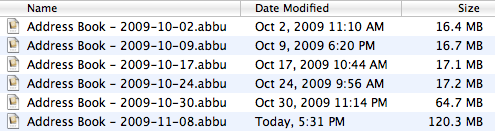
In a two-week period the duplication happened multiple times. From
October 24 to October 30 it happened twice increasing the size of all
images from 17 to 34MB and then again from 34 to 64MB. It happened again
doubling from 64M to 120MB! The culprit here are the images associated
with contacts and stored in
~/Library/Application Support/AddressBook/Images.
This behavior is on my Mac Pro which is synchronized with MobileMe to my
MacBook Pro and iPhone. However, the error isn’t the same on all
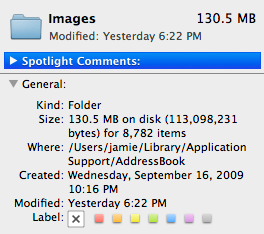
synchronized Macs. Looking in the images directory on my Mac Pro there
is 130.5MB of data with 8,782 files.
The same folder on my MacBook Pro is much smaller at 17.9MB with 1,222 items, however even that is too many.
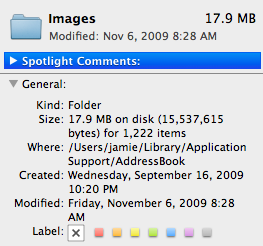
To put this into context my address book has 979 cards in it and I tend to associate an image with most entries. Sadly when I look at the images directory manually even the one on my MacBook Pro has duplicated once.
It is very hard to figure out what is going on that directory since the file names are all just random GUIDs. The best way I’ve found is to sort by file size which usually puts the duplicate files right next to each other. It seems likely that these extra files are just ignored, but they are taking up a lot of space and I worry will lead to eventual corruption.
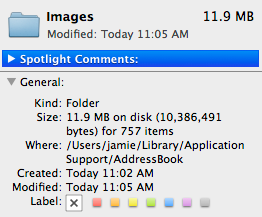
If you use MobileMe I’ve found a way to fix this. Do a Reset Sync data and choose to replace your content on your computer with the data from MobileMe. After doing that my images directory is healthy at 11.9MB with 757 items in it.
Strange and concerning behavior. Does anyone else see this behavior?