
2007
-
Consistency is important. You want to make sure that regardless of camera, subject or any other variable there is a consistent way to find a photo.
-
Uniqueness of photo name is important. Even though the directory structure would allow for multiple files with the same name, you should guarantee that every file is unique and “fully qualified” for each individual photo.
-
Backup management is handled most simply through your file structure. I don’t like to rely on fancy backup programs to know what has been backed up or not, I like to be able to achieve this through chronology.
-
Your photos live in a root directory. This could be anywhere and just identifies the home of all photos.
-
Start your directory structure with the year. There should be a year for every year you have photos. This cascades into months and finally days.
-
The “day directory” itself is typically auto-created by your importing software but it likely won’t have the a title for it (e.g. “Around House”). I add this myself, and I have an additional trick in that I don’t add that text until I’m done doing post-processing on those photos (purging, keywords, metadata, etc). The other reason to add a title is to give you some visibility on what you are looking at when you are just looking at your directory structure.
-
The filename itself is really simple. I always use YYYYMMDD (year, month, day), dash, HHMMSS (hour, minute, second), dash, and lastly the serial number of the photo from the camera. The serial number is important since you may take photos in burst mode and have more than one in a second. Or, if you are shooting with multiple people and multiple cameras, and happen to take a photo in the same second, you are still unique. I could put more here (camera serial number, ISO, etc. but I’ve never found it necessary). The completeness of the timestamp inside the filename is great. I can always figure out the full path to any file just using it’s filename.
-
The last “Other” is a catch all. Sometimes I get copies of photos that other people take. I don’t typically interleave these with my photos, and instead just drop them in the Other directory. This is a catch-all for such photos, sometimes even having directories inside other like “Bob’s Trip to Alaska”, that is all grouped together. The other directory is last which is helpful for backup.
Going Offline with Google Gears
I just spent a little while getting caught up on a variety of sites with Google Reader. Reader is my RSS tool of choice. This isn’t all that special, except that I did it while sitting on an airplane.
Last night Google released the first “developer release” (alpha?) of Google Gears, and along with it Google Reader got a revision to allow you to go offline using Gears. The experience was pretty amazing. Reader works just as you would expect it to. You launch your web browser, go to the Reader URL and instead of the expected error since your not online, you actually get the site but in offline mode.
This is a first release for Reader using the offline capability so it’s a little overly modal (either offline or not) and some features are frustratingly unavailable, particularly marking all items read. To my surprise sharing items is available.
Google Gears, the technology that makes this all possible, provides a nice suite of features to make this all work. I’m assuming that the Googleplex is hard at work on making an offline version of GMail, it’s the most obvious next candidate. I did a little poking around the developer documentation for Gears and I was really excited to see that all the hooks are there for ‘sometimes offline’ applications. With a little bit of ingenuity we should see web applications that seamlessly go online and offline as needed. I’d love to see this in a number of tools – all the 37 Signals applications, Wordpress, Google Calendar.
I think this is a big moment. The Internet is nearly pervasive, but there are times when it may be unavailable. The biggest net benefit of technology like Gears may be in making applications much more resilient to transient network failures – in addition to the offline experience.
It will be worthwhile to keep a close eye on this space.
Update
I used this on the flight back with a lot more unread items and it again worked great. Going offline took more time since there was more data. The lack of a mark all as read feature in offline Reader is a real pain though.
Update 2
I tried getting this going in Firefox on Vista and the installer fails. The Mac OS X Firefox install is a breeze and is just a browser plugin. The Windows install is a separate installer. YMMV.
Used the BlackBerry 8800 + GPS + Google Local to get coffee in completely random locale. Now watching myself walk on the map on the BlackBerry. Geek++
Car service is a fully decked black suburban! I feel like I’m in the secret service. Where is POTUS?
iTunes 7.2 just showed up in Soaftware Update with DRM-free downloads. Guessing I know what Jobs said at AllThingsD.
Dissapointed that it seems very hard, to impossible, to get a plug-in converted Toyota Prius.
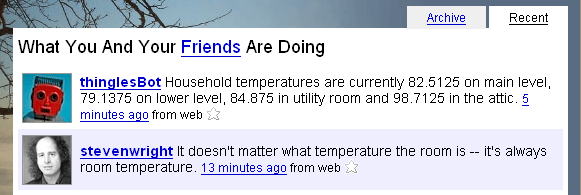
My Robot and Steven Wright
A friend of mine forwarded this screen capture from a friend of his who grabbed this great Twitter moment. It seems my robot and Steven Wright (also on Twitter) are on similar wavelengths.
Drive to Work Take 2
Time for “Take 2” of my drive to work time elapased video!
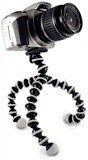
I really liked the first take at this, but the camera was mounted very poorly. Think tape combined with a rear-view mirror and you get the idea. It was swinging around and shaking with abandon, which caused a ridiculous video. I was looking at getting a Gorillapod for my trip to Canada in a couple of weeks and it was also the perfect tripod to mount a camera on my dash. This, combined with an overcast day that gave more even light and a closer position to the windshield to eliminate a lot of the grime on the glass made for a significantly better video.
For comparison, here is the first one as well. Try hitting play on both of these at the same time to see the differences.
Directory Structure for Digital Photos
It seems that a lot of people have a hard time settling on a file structure to use for their digital photos. There are a number of different approaches, and the tools that you use will heavily influence this but I think it’s important to settle on something independent of your tools since those will change over time.
There are a couple of things you want to make sure to accomplish with the directory structure that you use for your photos.
I’ve been using the following structure for over 5 years and I’ve found it to work very well. I’ve used it with a number of different photo management programs, including my current favorite, Adobe Lightroom. It is inherently driven off of the timestamp of the photos.
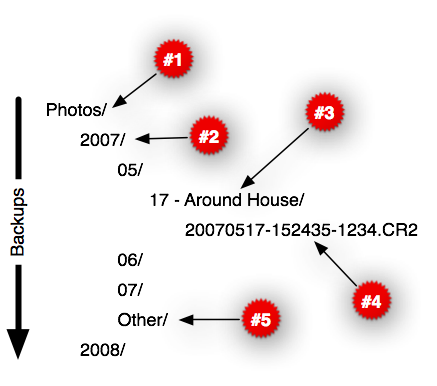
Let me highlight the five critical sections of this (cross-reference to numbers above, sorry Tufte).
The backup strategy for this structure is a simple top-down flow. I never backup a month until it’s completed. The great thing here is that once the time has passed, the directory and files in those directories are not changed so you don’t have to worry about going backwards in time. (Note, I also mirror files every night, and this is automated to other discs.)
Just bought greenrequest.com.
Got home after running (and walking) my first 5k in forever.