How to Remove Your “Wall” on Facebook

by Jamie Thingelstad on January 5, 2009

in Techie

I’ve become more of a fan of Facebook over recent months (see my profile). They have made a number of improvements that I really like, and the number of people joining the service seems to just increase more and more over time. I’m really amazed at home many people you can find on it. I think they are well on their way to being the de facto White Pages of the Internet.

With that said, I don’t like the Wall feature of Facebook at all. For whatever reason, I’m just not real hip on anybody coming to my profile and just typing away. I’ve turned my wall off for a long time, and enough people have commented to me “Hey, you don’t have a wall! How did you do that?” that I thought I would share how to remove your wall.

Now, to be clear, we are not removing the wall per se. Facebook will not allow you to remove the Wall application. Instead, we are going to adjust privacy settings to hide the wall entirely. First, go to your privacy settings.
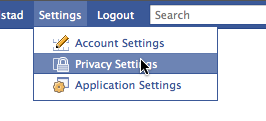
Facebook Settings Privacy Settings.png

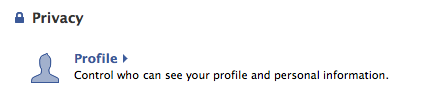
Now click on your profile.

Facebook Privacy Overview Profile Button.png

In this screen, scroll down a ways and you will find the “Wall Posts” section. Simply change your settings to look like this. Uncheck the “Friends may post to my Wall” box and change the privacy option.

Facebook Profile Privacy Wall Posts.png

You could set this so that only you can write on your wall if you want. There are a couple of different options. I have it set like above which effectively removes the wall.

[Jan. 8, 2009: I've gotten some questions from people saying this doesn't work. I think the challenge is catching the result. I'm adding this section to help illustrate what this does.]

Result

Now that you have made this change you probably want to check to make sure it worked. This is a little hard on Facebook since it’s not terribly easy for you to see your profile as someone else. Facebook does have a feature that allows you to test this out, in your Profile Privacy settings, where you changed your wall privacy options, you can type the name of a friend and see your profile as they would see it. This works great for testing, particularly if you are using Facebook groups to assign privacy levels differently for various people.

Profile View As.png

You may be confused that even after these changes your profile will still have a tab called “Wall”. That is impossible to remove, per my earlier comment that we cannot really remove the Wall. It’s integral to the functioning of Facebook. All we did was remove the ability for people to write stuff on it.

Before these changes this is how a friend would see your wall.
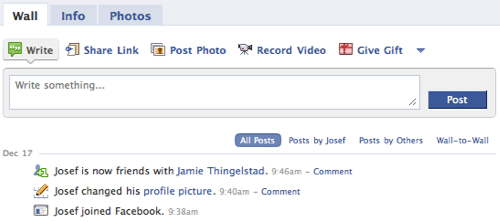
Facebook Profile With Wall Open.png

Note the option to Write on the wall. After making these changes a friend sees your wall like this.
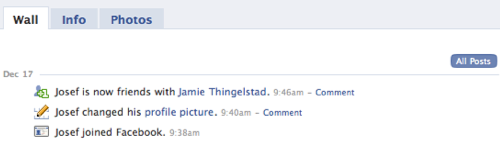
Facebook Profile With Wall Private.png

The option of writing on your wall is gone now.

Related posts

{ 34 comments… read them below or add one }

AC January 8, 2009 at 6:00 am
Hi there,

thanks for your little tutorial. I did exactly as you said but for some reason the wall is still there. I can see it and everybody else can see it as well. Any idea why this happens?

Cheers

Reply

Jamie Thingelstad January 8, 2009 at 8:26 am
@AC,

I’m pretty positive that these changes will work. I added a section to this blog post with some before and after screenshots to show the effect of the changes. It’s a little hard to catch, particularly looking at it while logged in as you. See the “Result” section I added above.

Reply   More from author

Giancarlo Bruni January 30, 2009 at 5:21 pm
Hi, when you remove your wall, you can still use updates (such as friend adds) to write on the wall by commenting on them. Is there any way to turn this off?

Reply

Rawr McJeanie February 1, 2009 at 8:43 am
sick. it worked. you my friend, are a genious.

Reply

Fran February 22, 2009 at 9:24 am
Thanks – but people can still write by hitting the ‘comment’ option after anything that comes up (such as ‘is now friends with…’ and typing away.

Is there no way of just deleting the whole wall thing altogether?

Reply

Jamie Thingelstad February 23, 2009 at 9:42 pm
Fran,

I’ve looked pretty extensively to see if you can turn off the ability for people to comment on events on your wall and haven’t found anything. It seems that you cannot disable it.

You cannot remove your wall altogether since it is in essence the “logging” place where Facebook aggregates things. You can limit the number of things that get posted to your wall, and that would help keep the number of items that people could comment on down to a minimum.

Reply   More from author

Paulus March 2, 2009 at 10:59 am
OK, so this is great for making it so that no one may post to your wall. What I am interested in is privacy settings. I’d like to make it so that my “limited profile” friend group can’t see my wall at all, and that my “trusted friends” group can see all of it. The tab is still there, such that people in my limited group can see things that I don’t want them to see. For instance, I don’t want certain people to see when I post a link, or when I comment on a link, but I want my trusted group to be able to see that. Is there a way to do that? I notice that the “photos” tab gets removed when you set it for only specific groups. Why isn’t the wal ltab the same way?

Reply

Jamie Thingelstad March 2, 2009 at 7:18 pm
Paulus,

I don’t believe that you can do what you are trying to do. The Wall serves a “system” purpose in Facebook, which is why you cannot remove it completely. Photos are not at the same level. In fact, Photos is really just a Facebook App that is pre-installed. Wall is something much more integral to Facebook, so the best you can do is just severely limit it.

Reply   More from author

Amaranta March 4, 2009 at 7:38 am
Hi,
I have this kind of a problem: I can’t see the wall of one of my friends at all. He is still in my friends list but all I can see when I click on his profile is: info, photos and boxes. How is that possible?

Reply

random guy March 4, 2009 at 8:42 am
hm. sorry to say but this article and some of these comments are just not correct. it’s entirely possible to completely remove the wall tab from everyone’s view, including your own:

1) click settings
2) click profile
3) make sure the checkbox for “friends may post to my wall” is actually *checked*
4) a drop down will appear if it’s checked, choose “no one.”
5) uncheck the checkbox & save

cheers

Reply

Amaranta March 4, 2009 at 3:56 pm
yes, that is true. you can also choose specific people that can’t see your wall.

Reply

Horner March 9, 2009 at 3:47 pm
How exactly would you accomplish that?

Reply

griff June 4, 2009 at 12:39 am
I would also very much like to do this. Any suggestions?

Reply

lroby June 19, 2009 at 9:27 am
this is not correct. you cannot check the “friends may post to my wall” and at the same time select “no one.” unchecking the “friends may post to my wall” box afterward just unselects the “no one” box again. you can’t do both.

Reply

-T. March 4, 2009 at 10:47 pm
I actually have been goofing around with locking down all privacy settings throughout my account and successfully managed to make the wall disappear altogether. It was some magic combination of privacy settings locked down completely, combined with placing all of my friends in a friends list and excluding that list from all account features … and, disabling wall notifications in my inbox. When you uncheck the wall, the system prompts you with two options, one of which is the removal of the wall. Pretty cool.

Reply

delquattro March 20, 2009 at 3:17 pm
This is great! Talk about annoying…all these people writing comments on my facebook page. Is there a way to eliminate friends, too?

Reply

Paul May 12, 2009 at 2:02 am
The title of your article: “How to Remove Your “Wall” on Facebook”

Your comment on Feb. 23rd: “You cannot remove your wall altogether since it is in essence the “logging” place where Facebook aggregates things. ”

…Since there are lots of people who want to completely remove the wall tab, you might want to rename this article so people don’t waste their time reading it. Maybe call it, “How to reduce the comments on your wall” or something to that effect.

Reply

Gail May 18, 2009 at 1:40 pm
Do you have any idea how to remove pictures from your photo wall. I can remove them from albums, but for some reason they will not let me remove them from my photo wall. It is driving me crazy. Can you help?

Reply

Sue May 20, 2009 at 11:54 pm
OMG I’m freaking out ….I posted a response to a friend that posted a comment on my wall, …..I meant for only her to see it ….I thought wall to wall was one on one – …..I’m concerned about who can see it – can her friends see it? Can mine see it? I have some ‘friends’ I just don’t want to see it, ……it was meant for me to her – When I responded to her ….will it show up on my wall?? …and can my friends see it? (told you I’m freaking out – I said it twice I know) but you seem pretty good at this, ……thanks for your help in advance!

Reply

delquattro May 21, 2009 at 9:15 am
Sue,

Did you immediately remove your wall post? (You can do that.) For correspondence that you wish to be private send a message (at the top of the facebook page – click on “Inbox” and go from there.

Reply

denise May 27, 2009 at 6:52 am
Thank you SO MUCH for this…. I just did as you outlined.. and now will wait and see how it plays out….. I, too, enjoy facebook for its ability to help us all connect, but I do NOT enjoy the endless drivel that people just pop in and put on my wall. No patience for that. And why would anyone visiting my page be interested in who took what personality test….. why everything we do has to be ‘reported’, documented, twittered……. I have no idea……my favorite ‘report’ goes to the woman in the stall next to me in the ladies’ dressing room of a dept. store, on her cell phone, giving a step by step account of the dress she was trying on… ‘well… it’s a little tight.. maybe I should get the next size…. but I really wish they had it in blue…. ‘ blah blah blah…. and to think the person on the other end had nothing else going on in HER life that she was the willing audience in all of this…. too much………………………….

Reply

denise May 28, 2009 at 6:43 am
Ok…. so yesterday (see post above)… I did as outlined…. and this AM just saw that there are many new and very recent (an hour ago) posts on my wall….. !*_!*@_*_@!)&^#(^!(()!_)!_)!!

I did as suggested.. to type in a friend’s name to see what they see on my profile.. and the option to ‘type something here’ is indeed gone, but then how did that same person’s post appear on my wall an hour ago?

HELP !! I was so relieved to think I found a way of eliminating this endless drivel…

SOMEONE OUT THERE>.. PLEASE HELP… let me know what I am missing..

Thanks

Reply

SNOW May 31, 2009 at 10:08 am
Thank you for the tips!

How can i remove my wall without disabling the posting function on my wall? ie. people can still post on my wall but others will not see what they wrote

Thanks a lot!

Reply

lroby June 19, 2009 at 9:55 am
set your privacy settings so that who can view this is set to “only me. “

Reply

Damon May 31, 2009 at 7:35 pm
I was wondering if i could make som,eone able to post on my wall but not see posts other people have made on my wall?
Is this possible

Reply

Louisa June 3, 2009 at 11:55 pm
Is there a way to HIDE posts/updates on your facebook wall without REMOVING them? As in, I want to save that history on my wall just don’t want it to be visible to everyone. Please let me know, thanks.

Reply

c.simmons June 9, 2009 at 7:57 am
good morning, is there a way to remove comments, photos, etc., from friends and post from myself without losing them entirely. when i go to remove or hide a comment, it says i will lose a feed to these people, and i will no longer receive anything from them. i would like to just clean it up from day to day, keeping some and tossing other comments without losing them ? thank you

Reply

haiku June 10, 2009 at 1:26 am
to remove the wall:
go for a walk, a swim, or
don’t join slavebook y’all

Reply

Jamie Thingelstad June 10, 2009 at 7:21 am
Nice Haiku! :-)

Reply   More from author

Matt June 11, 2009 at 8:45 pm
I’ve made a group and blocked them from see most things on my wall but they can still see the events I have RSVP’d to, the mobile photos I uploaded, the causes I have donated to, etc. How can I remove these from their view?

Reply

Jeff June 21, 2009 at 3:04 pm
I have a question ive been wondering about for quite a while. Hopefully someone can help me :)

Im a bit confused.
I have my family on their own group so they cannot see what everyone writes on my wall. However if I put it so they cant see my wall, they also cant write on my wall.

Is there a way to fix this, so they cant see what people write on my wall but they can still write on it at the same time.

thanks

Reply

Jamie Thingelstad June 21, 2009 at 5:45 pm
To my knowledge you cannot allow people write permissions to your wall without also having read permissions.

Your question makes me wonder what these friends are writing on your wall that you don’t want your family to see. :-) Unfriend your family?

Reply   More from author

Brittney June 26, 2009 at 12:37 pm
Is there a way to hide what certain friends write on their own walls? It comes up on my page when I log-in, and some of these people write the weirdest stuff. I don’t want to know what she had for breakfast, and I don’t care what he named his dog. I have to scroll through all of the crap to read the stuff I really do want to read from people who matter!

Reply

johnny June 29, 2009 at 7:18 am
Oh man, thanks! I’ve had some idiot following me around, “peeing” on my wall every time I write something. Now she can’t do this anymore! Now I can write with complete immunity!!! Freedom!!!

Reply

Leave a Comment

Additional comments powered by BackType

Previous post: Chase in the Snow

Next post: MobileMe Needs Time Machine